
I was recently trying to connect to my local Teradata instance via the BTEQ (Basic Teradata Query) command-line tool and ran into a problem trying to login. I usually use the Teradata SQL Assistant GUI based tool, so I don’t need to do this very often.
The command to login while in BTEQ is:
.logon [TDPID]/[username]
But how do you know the value of TDPID? Well, if you’re running Teradata and you’re logged into the computer it’s installed on, you can follow these steps:
- Open up Teradata Service Control.
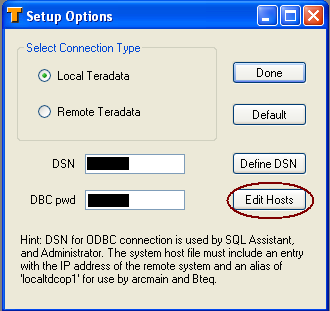
- Choose the “Advanced Setup” menu option.
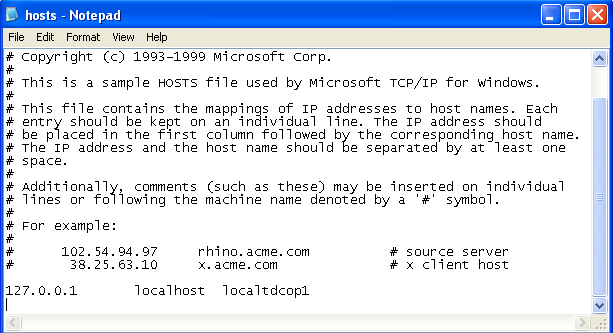
- On the dialog box, click the “Edit Hosts” button. This will open your local hosts file in an editor (probably notepad).
- Look for an entry that looks like this:
127.0.0.1 localhost localtdcop1.
You’re TDPID is the part of the string before “cop1”, so here it’s “localtd”.

 In the sludgy, squdgy creek
Thank you the information given above helped me allot.
i don’t have anything ending with cop1 in my hosts . I just have this
127.0.0.1 localhost
Dante, I’m afraid I left the job where I worked with Teradata, so I can’t tell you where to find the process id anymore, but you could try localtd. If you have a local install of Teradata Express 12, like I did, that was the default process id. This post was based off of Teradata 12, so they may have changed this with Teradata 13.