
Before Christmas break I upgraded my GWT Eclipse plugin. This morning, after rebuilding and trying to run my GWT (Google Web Toolkit) application, I ran into this error:
Exception while dispatching incoming RPC call
com.google.gwt.user.client.rpc.IncompatibleRemoteServiceException: This application is out of date, please click the refresh button on your browser. ( Expecting version 5 from client, got 6. )
at com.google.gwt.user.server.rpc.impl. ServerSerializationStreamReader.prepareToRead(ServerSerializationStreamReader.java:432)
With GWT RPC (remote procedure calls), GWT serializes and deserializes function arguments on your behalf, so they can be passed over the wire to/from Java/JavaScript. This is quite nice from a programming perspective, since you don’t have to devise a JSON or XML scheme of your own in order to transfer data between client and server.
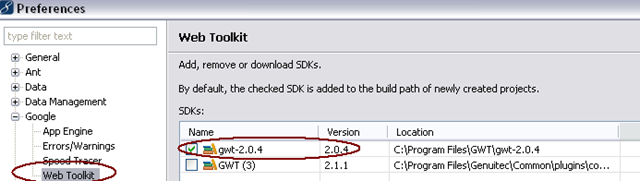
Anyhow, considering the error description and what RPC does, it seemed clear that the client and server sides of the serialization/deserialization process were incompatible. Since I just upgraded, it seems that the JavaScript side was using the new GWT 2.1.x, included with my plugin upgrade, whereas my server was still using the 2.0.x version that I wanted it to. Since I was using the plugin to compile my code to JavaScript, the trick must have been to change the plugin setting to use 2.0.x. I was able to do this via Window > Preferences > Google > Web Toolkit:
That wasn’t all though. My development mode was also using the 2.1.x version. In that case I got this error:
[ERROR] Invalid version number “2.1” passed to external.gwtOnLoad(), expected “2.0”; your hosted mode bootstrap file may be out of date; if you are using -noserver try recompiling and redeploying your app
This was a result of my hosted.html file being cached by the browser. Since I had tried to use devmode after mistakenly compiling with the 2.1.x GWT compiler, my browser had a cached version of hosted.html. By clearing my browser cache and restarting, I was able to pick up the newly compiled hosted.html, and devmode started working.
 In the sludgy, squdgy creek
Great! thank you, I had the same problem.