
Assumption: Liferay 5.1.2 on tomcat using default HSQLDB, which comes pre-configured with the download
Steps:
- Switch to the MyEclipse Database Explorer perspective
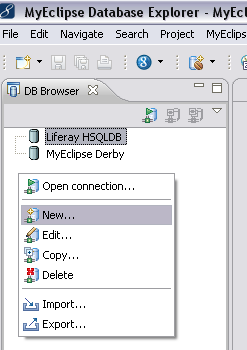
- In the DB Browser window, right click, and choose New…
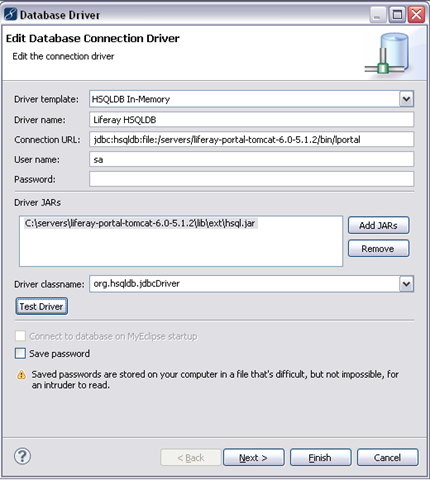
- Fill in the fields with the values shown below:
- Notes:
- You can use any name you want for the Driver name.
- The screenshot assumes the liferay/tomcat bundle is installed at /servers. Change your url to the correct location for your server. Later versions of liferay have the db in a different directory, so if you’re not on 5.1.2, you also may have to change from the bin directory to your db directory (see the connection information in root.xml if you’re not sure where it is).
- The password is blank.
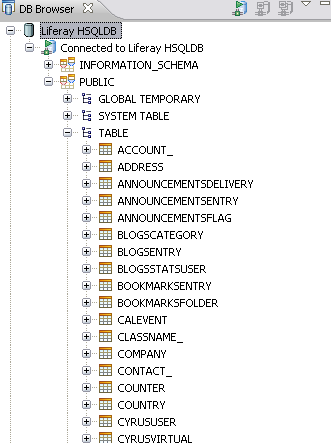
- Finally, click Finish, and you can browse your database.
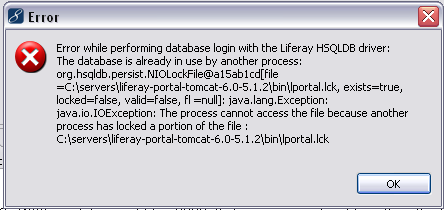
- BUT… if you see the message below (“Error while performing database login with the Liferay HSQLDB driver: The database is already in use by another process:”), it’s probably because Liferay has locked the file. In that case, you’ll need to stop Liferay to open the database.
Related information: http://www.liferay.com/web/guest/community/wiki/-/wiki/Main/HSQLInspect
And if you’d rather use the built in hsql DatabaseManager, you can, with this:
java -cp <path of hsqldb.jar> org.hsqldb.util.DatabaseManager
 In the sludgy, squdgy creek