
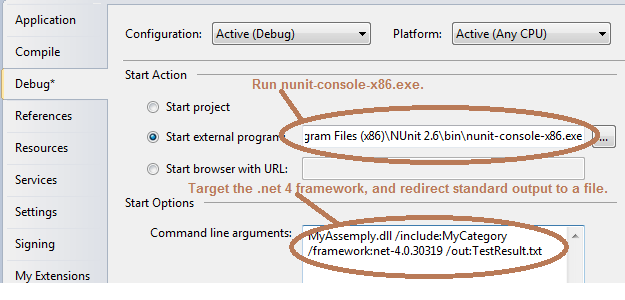
This is for my own future reference. I had nunit tests that I was able to debug without any problem in Visual Studio 2008, with a dll that was targeting .Net 2, but I needed a feature in .Net 4 for a POC. I converted the Visual Studio project to VS 2010, and changed the dll and unit test dll to compile for .Net 4. The tests still ran fine, but I could no longer break in the debugger (from F5). In order to do this, I needed to target .Net 4 framework with the nunit /framework switch (see image), and…
to configure nunit-console-x86.exe to run with .Net 4 by commenting out supportedRuntime version=”v2.0.50727” in C:\Program Files (x86)\NUnit 2.6\bin\nunit-console-x86.exe.config, like so:
|
<?xml version=”1.0″ encoding=”utf-8″?> <runtime> <!– Run partial trust V2 assemblies in full trust under .NET 4.0 –> <!– Look for addins in the addins directory for now –> </runtime> |
The top screenshot also shows that I’m redirecting standard output to a file. This is because I’m doing some crude performance analysis in the tests, collecting timing information and then writing it to standard output. This file (“TestResults.txt”) gets written to the same directory that the dll is in. I’m also targeting a particular test category (“MyCategory”), because the test suite has many more tests, but I only care about one group (aka category).
 In the sludgy, squdgy creek