Configuring the MyEclipse DB Browser to View the Liferay Portal Database

Assumption: Liferay 5.1.2 on tomcat using default HSQLDB, which comes pre-configured with the download

Steps:

  • Switch to the MyEclipse Database Explorer perspective
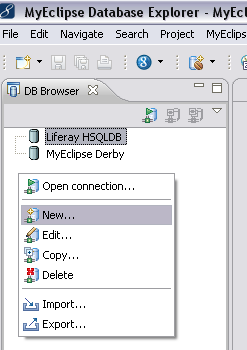
  • In the DB Browser window, right click, and choose New…

image

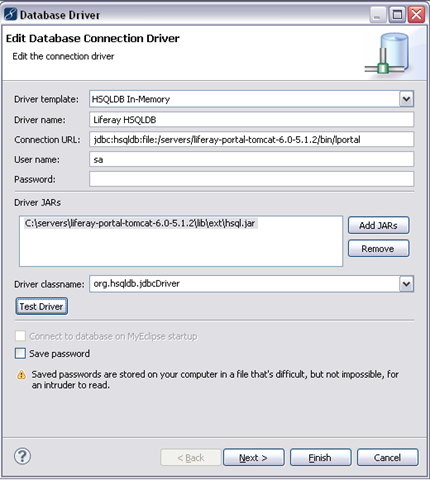
  • Fill in the fields with the values shown below:

image

  • Notes:
  • You can use any name you want for the Driver name.
  • The screenshot assumes the liferay/tomcat bundle is installed at /servers. Change your url to the correct location for your server. Later versions of liferay have the db in a different directory, so if you’re not on 5.1.2, you also may have to change from the bin directory to your db directory (see the connection information in root.xml if you’re not sure where it is).
  • The password is blank.
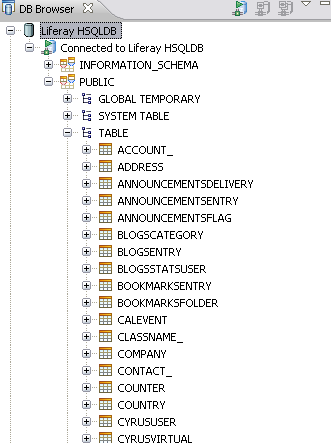
  • Finally, click Finish, and you can browse your database.

image

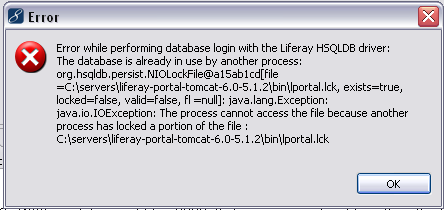
  • BUT… if you see the message below (“Error while performing database login with the Liferay HSQLDB driver: The database is already in use by another process:”), it’s probably because Liferay has locked the file. In that case, you’ll need to stop Liferay to open the database.

image

Related information: http://www.liferay.com/web/guest/community/wiki/-/wiki/Main/HSQLInspect

And if you’d rather use the built in hsql DatabaseManager, you can, with this:

java -cp <path of hsqldb.jar> org.hsqldb.util.DatabaseManager

Posted in Database, Eclipse, Java Development | Leave a comment

Liferay 5.1.2 Web Services with a .Net Consumer

This is a simple step-by-step list of how to access the Liferay UserService from a C#.Net client, using Visual Studio 2010 to generate the proxy classes. I’m including this here because I ran into a number of issues while doing this myself, and want to record it for future reference.

Overview:

Steps:

  • Configure Liferay to allow connections from your client. Do this in portal-ext.properties (webapps\ROOT\WEB-INF\classes). The highlighted IP Address below is the IP address of the machine I was running from. You may only need 127.0.0.1:

##
##  Web Services
##   
axis.servlet.hosts.allowed=127.0.0.1,153.64.211.54,SERVER_IP
axis.servlet.https.required=false

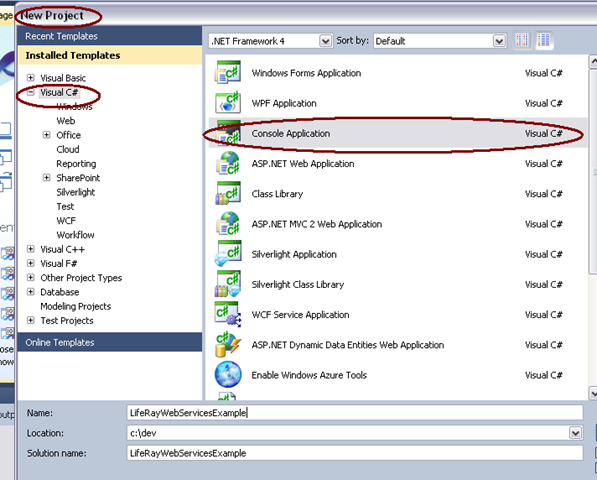
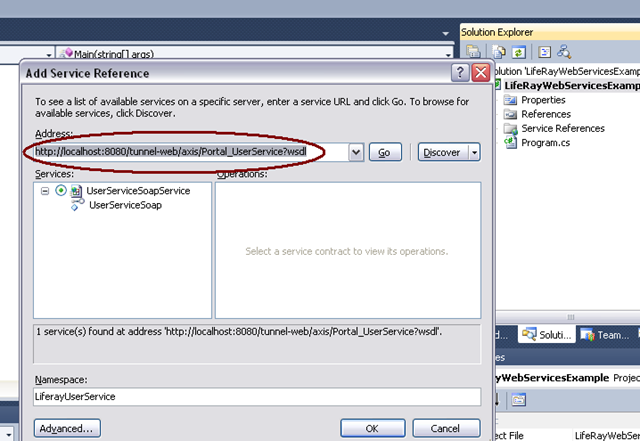
  • In Visual Studio (VS) create the project as a console application.

step1

step2 

  • The create project wizard will have created a file named Program.cs. To that, add the lines of code highlighted below, and run in the debugger:

using System;
using System.Collections.Generic;
using System.Linq;
using System.Text;
using LifeRayWebServicesExample.LiferayUserService;

namespace LifeRayWebServicesExample
{
    class Program
    {
        static void Main(string[] args)
        {
            var client = new UserServiceSoapClient();
            var user = client.getUserByScreenName(1, “joebloggs”);
        }
    }
}

  • You should get an InvalidOperationException with the message, “RPC Message updateUserRequest1 in operation updateUser1 has an invalid body name updateUser. It must be updateUser1”. This is a problem in the proxy classes that were generated. We’ll need to edit these to get past the problem.

step3

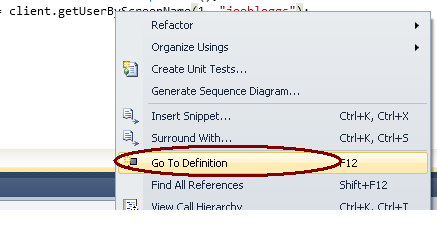
  • Right click on the method getUserByScreenName and choose Go To Definition. This will open the file we want, Reference.cs (LifeRayWebServicesExample\Service References\LiferayUserService\Reference.cs).

step4

  • Look for a piece of code that looks like the code below, and change “updateUser” to “updateUser1”. Run in the debugger again.

[System.ServiceModel.MessageContractAttribute(WrapperName=”updateUser“, WrapperNamespace=”urn:http.service.portal.liferay.com”, IsWrapped=true)]
public partial class updateUserRequest1 {

  • You should get another InvalidOperationException with the message, “RPC Message updateUserResponse1 in operation updateUser1 has an invalid body name updateUserResponse. It must be updateUser1Response”. We need to make more edits in Reference.cs. On the partial class updateUserResponse1, change the WrapperName from “updateUserResponse” to “updateUser1Response”. Run in the debugger again.

[System.ServiceModel.MessageContractAttribute(WrapperName=”updateUserResponse“, WrapperNamespace=”urn:http.service.portal.liferay.com”, IsWrapped=true)]
public partial class updateUserResponse1 {

  • This time you should get a FaultException, with a message that you have a “java.rmi.RemoteException”. This means you’re getting to your Liferay instance. If you look in your tomcat/liferay logs, you might see something like the error showing below. It’s time to fix our authentication.

17:06:29,561 ERROR [UserServiceSoap:60] java.lang.NullPointerException
java.lang.NullPointerException
    at com.liferay.portal.security.permission.BasePermissionChecker.getUserId(BasePermissionChecker.java:54)
    at com.liferay.portal.service.permission.UserPermissionImpl.contains(UserPermissionImpl.java:99)

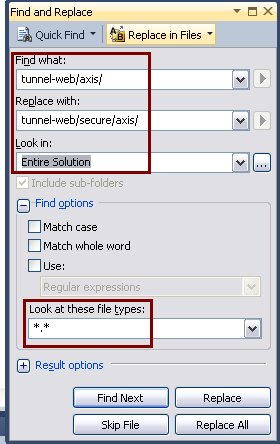
  • First we should be hitting the secure url for web services, http://localhost:8080/tunnel-web/secure/axis/Portal_UserService?wsdl. Note that this url is different than the one we used to generate the proxy classes. The easiest way to do this is to use the Replace in Files feature of VS. After making this change, run in the debugger again.

step5

  • Next you should see a MessageSecurityException, “The HTTP request is unauthorized with client authentication scheme ‘Anonymous’. The authentication header received from the server was ‘Basic realm=\”PortalRealm\”‘.” We need to change the configuration of our web service to send authorization information. Open the app.config file. Find the section that contains the binding for the web service and replace the security node.

Before:

        <security mode=”None”>
            <transport clientCredentialType=”None” proxyCredentialType=”None”
                realm=”” />
            <message clientCredentialType=”UserName” algorithmSuite=”Default” />
        </security>

After:

<security mode=”TransportCredentialOnly”>
    <transport clientCredentialType=”Basic” />
</security>

  • That’s not all though. Go back to the program’s main method and add login credentials. Adjust the UserName (liferay userId) and Password to match an authorized user in your system:

static void Main(string[] args)
{
    var client = new UserServiceSoapClient();
    client.ClientCredentials.UserName.UserName = “2”;
    client.ClientCredentials.UserName.Password = “test”;
    var user = client.getUserByScreenName(1, “joebloggs”);
    Console.WriteLine(user.greeting);
    Console.ReadLine();
}

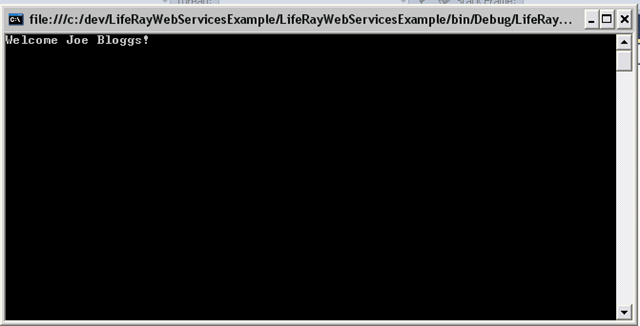
If you run now you should see this:

step6

That’s it. It’s not straight forward. This took me hours to figure out, but now that I have this recorded, it won’t take so long next time.

I’ve posted the source code for this on github: https://github.com/squdgy/LiferayWebServicesFromDotNet.

Posted in Portlets, Web Development, Web Services | 8 Comments

Vermont Hackathon aka VTHackathon

I’ve been attending a lot of free developer events over the last few years. I’ve been incredibly impressed at the generosity of speakers to give their time and of sponsors and hosts to donate space, food, swag, and even significant prizes for these events. I’m always trying to keep up with new technologies, and my interests are varied (as you could see from my blog posts or tweets); but it’s hard to find time to do this during work hours and even harder to force myself to do this during off-work hours. After all, there’s always laundry, dirty dishes, sports, and of course classic movies to watch.

Tech meetups, code camps, and hackathons are a great way to do this. Often, as developers, we’re tied into a particular technology or task at our day jobs, and there just isn’t time to try the new tools and technologies that we’re interested in. Hackathons can fill the void. In September I spent a week in Vermont, spending the first Saturday at the Vermont Code camp, and the following Friday-Saturday at the Vermont Hackathon. vthack The Hackathon was a 24 hour event using the MyWebGrocer(MWG) API any way you wanted to. And the various groups used that API in many different ways, including web sites, mobile apps, games, and even a power shell shopping utility! As the groups were presenting, there seemed to be a good number that were stepping outside of their comfort zone and working with some technology that they weren’t already comfortable with.  I think this is great.

Our team, Amazaboston, also chose to step out of our comfort zone, but not too far. Our team of 3, Joan, Bill, and I, chose to create a mobile, HTML5 application, targeted at the iPad. We used a mash up of product data from the MWG API, data from GoodGuide.com, and the unacceptable ingredients list from Whole Foods to give users a shopping list application that lets them easily choose to include or exclude products that are “healthy, green and socially responsible” (Ref.).

We used SenchaTouch as our front end framework. Although 2 in our team were experienced with ExtJS which is a sibling product to SenchaTouch, none of us had anymore than a passing experience with it (basically walking through sample code). We used .Net, WCF services, and SQL Azure for our back end. By choosing to do the mash up logic on the server, we were able to expose an Odata API that we could access directly from JavaScript via data.js. This made our client-server communication incredibly easy, greatly simplifying our JavaScript code.  Our basic architecture looked like this (we also had some Facebook integration, which is not shown):

vthack(1)


Our app is intended to help users filter out products from their shopping lists that they don’t want to consider for various reasons, including:

  • The product contains an ingredient I can’t or don’t want to use (because of allergies, special diets, or I just never want to have that ingredient (like high fructose corn syrup))
  • The product is produced in a manner that I don’t condone. (producers are not paid enough, child labor is used, etc.)
  • The product, its production, or the company that produces it is not ‘green’.
  • The product is not organic or is genetically modified
  • etc.

As with most hackathons, we didn’t leave with a completed application, but we left with the shell of an application that did mash up data with a very crude user interface. We left with more ideas for evolving the app, and a lot of new knowledge and experience. We also made some new friends. As a bonus, we took 2nd place! (First place was a really cool XNA game using MWG product data, and 3rd was an Android app that used the camera as a scanner to allow users to add up the cost of products they were putting in their shopping carts.)

Thanks to the organizers of the first VTHackathon. They were fabulous hosts. And thanks to the sponsors, FairPoint Communications, C2 (Competitive Computing), and Primmer Piper Eggleston & Cramer PC. Without them, this event couldn’t have been what it was. Hackathons are great experience. I think every developer should try to attend at least one.

Posted in Hackathon, JavaScript, Miscellaneous, Mobile, Web Development | 2 Comments

Is JavaScript eval really evil?

You may have heard this before: “eval is evil”. But is it really? And if so, why is it?

I’ll start with a quote:

“The eval function and its relatives (Function, setTimeout, and setInterval) provide access to the JavaScript compiler. This is sometimes useful, but in most cases it indicates the presence of extremely bad coding. The eval function is the most misused feature of JavaScript.” – Doug Crockford, “JavaScript: The Good Parts”

The eval method takes a string containing JavaScript code, compiles it, and then runs it. This one sentence might be enough for you to avoid it when you don’t need it. The compiler will use system resources, such as memory and cpu that will affect your application. If you can achieve the same logic without eval, your application will run faster, so why use it?  Then again, if your application is already screaming fast, a little delay from the JavaScript compiler should be no big deal. IMHO, this does not make eval evil.

Since the eval method executes script, you have to be more careful about user supplied data that may end up in an eval statement. Suppose you have an input field whose value is saved to the database, and that value is later used in an eval call. This code injection could certainly cause all sorts of serious problems for an end user. This is evil, but the real evil is the code injection vulnerability, not eval itself. If you use techniques to prevent such code from getting into your eval statement in the first place, you shouldn’t have to avoid eval for user supplied data. IMHO, this does not make eval evil, but is a good reason to avoid it when you can.

The most practical use of eval in the recent past has been for the parsing of JSON-formatted data when retrieving data via Ajax, but native JSON support is now available in all modern browsers as of the ECMAScript Language Specification, 5th Edition in Dec. 2009. If eval() is needed for JSON parsing, then in browsers that support it, JSON.parse() should be used. This means that eval for JSON parsing is only needed for older browsers.

Browsers that support the built in JSON Object and Grammar (reference):

  • Firefox 3.5+
  • Internet Explorer 8+
  • Opera 10.5+
  • Chrome
  • Safari

So my feeling on the subject: avoid eval when what you’re trying to achieve can be done without it. You can avoid performance degradation and reduce the risk of code injection security issues, and unless you need to support an old browser like IE7, you don’t need it for JSON.

Back to the quote… I agree that eval is often misused and often in the context of bad coding (I’ve seen a lot of it), but if you know what you’re doing, then your code should be in the “sometimes useful” bucket, and that certainly is not evil.

More References:

Posted in JavaScript, Web Development | Leave a comment

Book Review / Overview: “JavaScript Web Applications” by Alex MacCaw

Review:

 5of5stars

Wow. This book covers so much content that it could easily have been split into 2, 3, or maybe even 4 books. It is a book on building applications, not web sites (though many of the techniques would also work for web sites). And as such, there is a lot of emphasis on the engineering that goes into building such applications, from the design patterns we use, to testing, debugging, and deployment. With the power and features that newer browsers and JavaScript libraries are providing, we’re able to build richer and more full-featured web apps every day. In a lot of cases this means more JavaScript code, and the more code we have, the more important it is that we follow software engineering best practices.

I was on the fence about whether to give this book 4.5 or 5 stars. There is too heavy an emphasis on jQuery for my liking, but on the other hand, there is so much detail that I am sure that I will go back and try many of the examples and libraries referenced in the book. And, I have yet to see another book cover JavaScript applications in this way. So, just as a reference to how we can and should be building JS applications, I had to give the full 5 stars. If you’re building rich internet applications, or are planning to, I think this is a very useful read.

Overview:

  1. MVC & Classes – An overview of writing object-oriented JavaScript and of the Model-View-Controller (MVC) design pattern
  2. Events & Observing – Coverage of the DOM event model and descriptions of how JS libraries provide cross-browser support and add features for custom events
  3. Models & Data – Covers how to create data models that are completely client-side. It includes using HTML5 localStorage to persist values locally and how to use Ajax to communicate model changes back to the server.
  4. Controllers & State – Packs a lot of application patterns and information into 1 chapter, including client-side MVC, a JavaScript module pattern, libraries, state machines, routing, Ajax crawling and the Google Ajax Crawling Specification, and using the HTML5 History API.
  5. Views & Templating – This chapter focuses on the ‘View’ of ‘Model View Controller’. I found the in depth description of templating and data binding particularly interesting. I use a library that has these features, but it was good  to see how you would code this from scratch using jquery libraries that are available.
  6. Dependency Management – This chapter focuses on script dependencies. It introduces CommonJS, script loaders, and server side tools to combine and minify JS. It’s a very good reference chapter.
  7. Working with Files – Introduces the HTML5 File APIs, covering file inputs, drag/dropping of files, reading files, Ajax progress events and more. – (Note to self: MUST TRY SAMPLE CODE)
  8. The Real-Time Web – Covers WebSockets and the PubSub pattern with useful references to libraries such as node.js, Socket.IO, Juggernaut, and Pusher.
  9. Testing and Debugging – Introduces some JavaScript testing frameworks including QUnit and Jasmine, some drivers for continuous integration testing including Watir and Selenium, and libraries to help with headless browser testing including Envjs and Zombie.  It also briefly goes into Firebug and Web Inspector for debugging. This could easily be broken into 2 chapters or even a whole book.
  10. Deploying – A very nice introduction to things you should do, but don’t need to do, when deploying a JavaScript application. It includes information on caching, minifying, gzipping, and doing performance testing.
  11. The Spine Library – A lightweight Js library, written by the author, that includes MVC, events, and classes. It works with jquery or other libraries. Looks interesting.
  12. The Backbone Library – A lightweight MVC library with models, controllers, and views that depends only on underscore.js. It will work with jquery.
  13. The JavascriptMVC Library – An open-source jQuery-based framework that includes support for testing, dependency management, error reporting, package management, code cleaning, custom events, jQuery extensions, and documentation.

Chapters 15 – 17 are appendices: jQuery Primer, CSS Extensions, CSS3 Reference

Posted in Book Reviews, JavaScript, Web Development | Leave a comment

Vermont Code Camp III

I attended the Vermont Code Camp this past weekend. It was my 2nd time at the VTCodeCamp, but first time as a speaker. It was a very well-organized event with a ton of swag, lots of interesting presentations, and plenty of really great people. It’s a bit of a drive for me, but Vermont in September is beautiful, and the weather is just the perfect temperature. All around it was a fantastic day.

Well, Joan Wortman and I presented our updated talk on ExtJS 4. The audience size was around 30, and there seemed to be some real interest in the technology. We had some technical difficulties at the start, but I think we recovered ok, and I’m posting the slides here, like I promised I would.

PowerPoint Slide Deck

I’m updating my post, to add thanks to the organizers and sponsors, which I neglected to do first time around. My sincere thanks go to all the volunteers and sponsors. Without your involvement, this event just couldn’t have happened. Thanks, and I hope I am able to attend next year too.

If you’re reading this and have interest in other talks at the Code Camp, most of the slides can be found on slideshare: http://www.slideshare.net/tag/vtcc3.

Posted in Ext JS, JavaScript | Leave a comment

How to get my mouse unstuck from a virtual pc

For future reference on my Dell Latitude E6410, but probably works on many other pcs: Press the right Alt key, which is the “Host Key” on this laptop. This will release the mouse from the virtual pc. Reference: Switching between virtual machines and the host operating system

Posted in Miscellaneous | Leave a comment

Book Review / Overview: “Java: The Good Parts” by Jim Waldo

Review:

1_5of5stars

I’ve been programming in Java for many years, and I feel that I’m reasonably proficient at it, but I’m always looking to improve my skills and gain deeper understanding of the tools and technologies I depend on. I was hoping that this book would help me do that, and to some extent it did. I learned a few details I didn’t know before, but overall, I didn’t feel that this book was worth the time it took to read. I would describe this as a book of essays, with each chapter describing something “good” about Java or the Java ecosystem, not really a book intended to teach, though in some places it does try to do that. This made the book not really flow for me. I can’t quite figure out who the audience for this book was intended to be, and so I can’t recommend it at all.

Chapter by chapter overview:

Chapter 1: “Introduction” – the usual intro chapter. This one describes what is meant by “good,” – “the parts that aid in writing programs (or parts of programs) in environments in which Java itself is the appropriate choice of programming language and environment.”

Chapter 2: “The Type System” – “The good part about Java’s type system is that the separation between interface and class allows us to do our semantic design (which has to do with interfaces) separately from our class design (which has to do with implementations)”…. The conclusion is that strong typing and interfaces are good. Why good?

  • semantic design (interfaces) and class design (implementations) can be done separately which “allows us to think about the meaning without thinking about how we are going to implement that meaning, simplifying both tasks.”

Chapter 3: “Exceptions” – The chapter explains exceptions, and why it’s better than the old way of dealing with unexpected values from a function. According to this chapter, if you object to the exception mechanism, you may be one of the “lazy twits who don’t care about writing reliable code”. Why good?

  • separate error handling code to improve readability
  • force programmers to deal with problems as close to where they occur as possible
  • force programmers to deal with exceptions or to consciously ignore them

Chapter 4: “Packages” – Goes over basics of packages, including namespaces, and access control (private/public/protected). I wish I had this section to read when I was first learning Java, especially the part about  package access. Why good?

  • adds “understanding and isolation to your system, making it easier to comprehend, develop, and maintain”

Chapter 5: “Garbage Collection” – Has some interesting history on garbage collection, and explains how it works. The chapter also discusses how memory leaks come about in Java. I found this chapter pretty interesting. Why good?

  • the programmer does not have to do explicit memory management, which reduces bugs

Chapter 6: “The Java Virtual Machine” – This section covers the basics of what a virtual machine is and discusses the security and portability of Java code across JVMs. I totally agree that this is one of the “Good Parts”. Why good?

  • security – extra layer between the program and the computer isolates code from other code on the machine
  • portability – Java binary can run on any operating system that has a JVM: Windows/MAC/Linux/mobile devices etc.

Chapter 7: “Javadoc” – I’m not sure this is a good part of Java, since the documentation is generated by a tool that parses comments in your Java. There are similar systems in other languages, so even though this chapter is interesting, and I learned a couple of things about Javadoc, I don’t agree that this is a “Good Part”. Why good?

  • allows documentation to be embedded alongside the code being documented

Chapter 8: “Collections” – Yup. The interfaces and provided implementations of collections in Java is definitely one of the good parts. The chapter does have examples of using collections and also has a brief description of generics. Why good?

  • built-in collection implementations save time and effort
  • parameterized collection types (generics) allows compiler to guarantee type safety

Chapter 9: “Remote Method Invocation and Object Serialization” – I think this is useful, but I’m not sure if I agree that it’s one of the good parts. Why good?

  • ability to make calls over a network
  • serialization allows an object to be converted to a form that can be used to construct an identical copy of the object at a later time

Chapter 10: “Concurrency” – Best chapter in the book. It’s a nice, concise chapter on multi-threading which has just the right amount of introduction and explanation. Why good?

  • potential for improved performance when apps can have multiple threads running
  • Java was intended to be used to build concurrent programs, so it had language constructs for this from the start

Chapter 11: “The Developer Ecology” – More stuff that’s not part of Java… IDEs, frameworks, and other tools… Every mature language has these. I don’t think this chapter should be here. Why good?

  • save developer’s time and effort
  • “aid in the production of fully tested, bug-minimized code”

Posted in Book Reviews, Java Development | Leave a comment

Using default VM parameters for the TestNG plugin

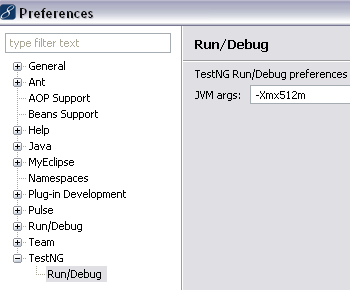
Here’s a feature I’ve hoped for for a long time, that is, the ability to set default vm args for the TestNG plugin.

http://groups.google.com/group/testng-users/browse_thread/thread/71ac5c77ad031086?pli=1,

One application I work on has hundreds of tests, many of which use a lot of memory. The way I would work with the plugin before this change: I would run a test, wait for it to fail, and then edit the run configuration settings to set the vm args.  Thanks to this recent change (Feb. 2011) to the plugin, I can simply set a default vm arg and use the menu options to run the test successfully the first time. Thanks!

Windows > Preferences > TestNG > Run/Debug

testng_eclipse_prefs

Posted in Eclipse, Java Development | Leave a comment

Liferay 5.1.2 logging

This post is a simple reminder to myself on how to change the logging of Liferay 5.1.2. I have a simple install of Liferay on tomcat 6.0. To change logging, just edit webapps\ROOT\WEB-INF\classes\log4j.properties and restart the server. I added this line: log4j.category.com.liferay.portal=DEBUG to get lots of debug information in my logs.

Posted in Java Development, Portlets, Web Development | Leave a comment