(Re-)Initializing Azure Development Storage

I just created a new Azure project the other day. It had been more than 4 months since I’d run any Azure code in my local development environment, but I had made changes on my computer. One significant thing I did was that I installed a SQL Server Developer Edition database engine, and stopped using SQLExpress. By default, development storage uses SQLExpress, so I needed to change this to use the new engine. Luckily for me, this was rather simple, because I had disabled SQLExpress, and my new database engine was running on localhost.

The error I got in Visual Studio looked like this:

Windows Azure Tools: Failed to initialize the Development Storage service. Unable to start Development Storage. Failed to start Development Storage: the SQL Server instance ‘localhost\SQLExpress’ could not be found. Please configure the SQL Server instance for Development Storage using the ‘DSInit’ utility in the Windows Azure SDK.

I fixed it by dropping into the command line and executing the dsinit tool (DSInit on MSDN):

dsinit /sqlinstance:.

This created all the tables that development storage needed, and I was back up and running with my development environment.

Next up: Update to the latest SDK!

Posted in Azure | Leave a comment

Book Review / Overview: “HTML5 and CSS3” by Brian P. Hogan

Review:

image

I’ve just finished reading “HTML5 and CSS3” by Brian P. Hogan (http://www.bphogan.com/) and The Pragmatic Bookshelf. I’m not new to HTML and I’ve even read another book on HTML5, but I really learned a lot from this book, and enjoyed the author’s writing style and examples, enough to give this 4.5 of 5 stars. It’s a great introduction to the not-yet-finalized HTML5 spec, and has a very nice section on the new CSS3 features. With all HTML5 references I’ve seen so far, there is a fine line between what’s in the HTML5 spec, what’s in CSS3, and what are extras. I think this author did a good job in not blurring the lines, and I’ll likely use this book as a reference for that in the future.

I think one of the strong points of this book is the examples. I tried almost all of them, which was easy, because all of the source code was online. Another strong point is the fallback strategies presented, because practically speaking, we’ll always need fallback strategies for browsers that don’t support the latest spec. The only reason I didn’t give this book a full 5 stars is that I would have liked to see a little more about offline web applications, and I wanted some more depth in some of the examples, but that’s just me – I learn better by doing. I certainly feel more empowered to use HTML5 and CSS3 features now and recommend this book.

And here’s the overview, chapter by chapter:

Chapters 1 & 2 are just the acknowledgements and preface to the book, so not much to cover here.

Chapter 3 is an overview of HTML5 and CSS3. I like the way this chapter presents the changes to these standards by describing not only what the changes are, but why we should want to use them. For instance, there is more descriptive markup, less reliance on plug-ins for media, improved accessibility, and visual effects etc. It even contains a nice section on deprecated tags and attributes which I hadn’t seen elsewhere. For instance, I’m surprised to see that the target attribute of the anchor tag has been deprecated, but I’m very glad to know it.

Chapter 4 covers the new structural tags and attributes. The tags are: header, footer, nav, section, article, aside, meter, and progress. Custom attributes using the data- pattern can be read via getAttribute() — nice. I took several things out of this chapter: Don’t confuse aside with sidebar. “The aside is designed to show content related to an article. It’s a good place to show related links, a glossary, or a pullout quote.” There’s a nice technique for using JavaScript conditional comments to define the new element types in IE versions lower than 9:

<!–[if lt IE 9]>
<script type=”text/javascript”>
document.createElement(“nav”);  …

There’s  also a nice example on how to use custom data attributes for window popups. In chapter 4, I also learned that I’ve been suffering from “divitis” for years now. You need to read this chapter to see what I’m talking about.

Chapter 5 covers the new form fields and attributes. The new form field types are specified by the input tag’s type attribute: ex. <input type=”text”> where “text” is the form field type. They include: email, url, tel (telephone number), search, range, number, date, datetime, and color. The new attributes are autofocus – used to focus on a specific form element; placeholder – browser supported placeholder text; and contenteditable – support for in-place editing of content. The author references and uses Modernizr in examples http://www.modernizr.com/. The examples are useful and extra functionality is used with jquery. I like the jquery way of life… to get things to work without jquery and enhance it with jquery, but some of the examples here need jquery to work, so the author proposes the idea of having completely independent html-only forms that post to the same server side script as the ajax actions – interesting idea, but could be a maintenance nightmare if you have a lot of them.

Chapter 6 is the first chapter that focuses on CSS. It covers these:

  • :nth-of-type [pay:nth-of-type(2n+1){color: red;}]  – Finds all an elements of a certain type.
  • :first-child [p:first-child{color:blue;}]  Finds the first child element.
  • :nth-child [p:nth-child(2n+1){color: red;}]  Finds a specific child element counting forward.
  • :last-child [p:last-child{color:blue;}]  Finds the last child element.
  • :nth-last-child [p:nth-last-child(2){color: red;}]  Finds a specific child element counting backward.
  • :first-of-type [p:first-of-type{color:blue;}]  Finds the first element of the given type.
  • :last-of-type [p:last-of-type{color:blue;}] Finds the last element of the given type.
  • Column support [#content{ column-count: 2; column-gap: 20px; column-rule: 1px solid #ddccb5; }] Divides a content area into multiple columns.
  • :after [span.weight:after { content: “lbs”; color: #bbb; }]  Used with content to insert content after the specified element.
  • Media Queries [media=”only all and (max-width: 480)”]  Apply styles based on device settings.

The chapter excels at showing how using some of the new features further separates content from presentation of that content. For instance, there is no need to specify that table rows are odd or even when you want to stripe the rows. It also does a good job presenting JavaScript options for adding these features to IE6-8. It introduced ie-css.js, which has morphed into selectivr.css http://selectivizr.com/ (author: Keith Clark).

Chapter 7 is all about improving accessibility and the parts of the WIA-ARIA spec that have made their way into HTML5. It covers the rolearia-live attribute, and aria-atomic attributes (ex.  <div role=”document” aria-live=”polite” aria-atomic=”true”> ).

  • role  – identifies responsibility of an element to screen readers. There are 2 types of roles, landmark roles and document roles. Landmark roles identify points of interest, such as navigation. Some html tags have default roles that can’t be overridden, such as the nav tag. It’s role is navigation. The landmark roles are: banner,  search, navigation, main, contentinfo, complementary, and application. The document roles are document, article, definition, directory, heading, img, list, listitem, math, note, presentation, row, and rowheader. ‘document’ is important because it means that the page is static content and not a web application.
  • aria-live – identifies a region that updates automatically, possibly by Ajax. Options are polite or assertive. Polite is designed to not interrupt the user’s workflow, so a screen reader will not stop because a section is updated. Assertive is designed to interrupt, as it signals that a high priority content update has occurred. This should be used only when necessary.
  • aria-atomic – identifies whether the entire content of a live region should be read or just the elements that changed. The true value instructs screen readers to read the entire contents of the changed region. A false value means to only read the nodes that have changed.

Chapter 8  covers the canvas tag. There is a nice example of using vector graphics to draw a logo, and I was happily introduced to the RGraph library, available at RGraph.net. I especially liked the example that uses the data-name and data-percent attributes along with RGraph and jquery to make a bar graph – a very useful technique to make your data available to everyone, but to have more interesting looking graphs for people who’s browsers support it.

Chapter 9 is the chapter on embedded audio and video and covers the, what-else?, audio and video tags. There is a nice, succinct overview of the challenges of audio and video in different browsers, on different devices, and then some good fallback tips. Some useful links are included for: Video For Everybody and Flow Player, which has an open source Flash media player. There is also a section on the limitations of HTML5 video. For instance, there is no provision for streaming video. (translation, the entire video needs to be downloaded to see any particular part of it) Also, there is no rights management.

Chapter 10 is entitled “Eye Candy”. It’s really about the extra, cool stuff in CSS3, including: border-radius, RGBa support, box-shadow, rotation (transform), gradients (linear-gradient), and @font-face. The example page is easy to play around with on your own. These are some of the useful references listed in this chapter for font support:

Chapter 11 is about client-side data, and more specifically Web Storage and Web SQL Databases which aren’t really part of HTML5. They have been spun off from it. It covers:

  • localStorage – stores data in key/value pairs, tied to a domain, and persists across browser sessions. 4kb max
  • sessionStorage – stores data in key/value pairs, tied to a domain, and is erased when a browser session ends. 4kb max
  • Web SQL Databases – fully relational databases with support for creating tables, inserts, updates, deletes, and selects, with transactions. It’s tied to a domain and persists across sessions.  Mozilla has vowed not to support Web SQL, so it may not survive, but it’s used in mobile browsers so may be useful for mobile web apps. The W3C is working towards implementing the IndexedDB specification.
  • Offline Web Applications – Defines files to be cached for offline use, allowing applications to run without an Internet connection. This is just touched on.

Chapter 12 covers other stuff outside of HTML5, history, cross-document messaging, web sockets, and geolocation. There’re simple succinct examples of each of these. I just wish these were in the spec today.

Chapter 13 is an introduction to what’s next and touches on CSS3 transitions, web workers (background processing for JS – yeah!), 3d canvas with WebGL, IndexedDB, drag and drop (dnd), and form validation. Some points taken away: dnd is not ready for primetime. IndexedDB may be the future of client-side data stores, but is not very far along.

Chapters 14-18 are really reference chapters. Chapter 14 is a quick reference of the new tags and attributes of HTML5, and of the new features of CSS3. Chapter 15 is a nice jquery primer, so you can skip it if you’ve used even a little jquery before. Chapter 16 lists some tools and techniques to encode audio and video for use with the new HTML5 audio and video tags. Chapter 17 is a list of external resources (links), and chapter 18 is a bibliography.

Posted in Book Reviews, Web Development | 1 Comment

GWT Tip: Don’t use your module name as the id of an HTML element in your page.

I spent a few hours tracking down and fixing something in our GWT application over the last couple of days, and thought I would blog about it in case someone reading this blog (maybe me in the future) runs into this same issue. The issue was simply that my external JavaScripts stopped working.

The stage: I was doing some major refactorings of the application. For the most part this involved moving files around, changing class and package names, etc. After this was done the application appeared to still work, but it didn’t. My external JavaScripts were not being executed. Well, debugging external JavaScripts within GWT is exactly the same as debugging it outside of GWT. Just fire up your favorite JS debugger – I used Firebug here, and set your breakpoints.

Debugging: I set 2 breakpoints. One in my external JavaScript file, and one in the code that uses it. The debugger stopped in my JS file, so I knew the browser was successfully loading my scripts and I could see that my objects were being declared. After “go”-ing, the debugger then stopped at the other breakpoint, but there, my objects were undefined…?!. This immediately signaled to me that my JavaScript and calling code were probably in different documents within the page. I searched the dom to see that my calling code was in an iframe that was named the same as my module name…

It turns out, this is the way GWT does things. When you load the page, the GWT *.nocache.js file creates an iframe in your page that has the id of your module, something like this (module name highlighted):

&lt;iframe src=”javascript:”” id=”testiframeid” style=”position: absolute; width: 0pt; height: 0pt; border: medium none;” tabindex=”-1″&gt;

Well, this all worked before I did my refactoring, and since the clues pointed to different documents, it seemed that this iframe could be the issue. I had renamed my module too, so I searched for another DOM element with this id. There was one. This was the problem. My DOM had 2 elements with the same id.

The fix: I changed the module name in the *gwt.xml file. ex. <module rename-to=’testiframeid‘> I could have changed the id of the other div, but since this was code that someone else wrote, I wasn’t completely sure if this id was needed for other functionality.

I tried this in a stand-alone GWT project to confirm this was always a problem. This only takes a few minutes to try. Steps:

  • Create a new GWT application
  • Compile/Run – no problems
  • Insert a dom element with the same id as your module name (defined in *.gwt.xml : <module rename-to=’testiframeid‘>)
  • Compile/Run – Application will not work.
This is the body of the main GWT html file that is created when you create a new GWT application. See the highlighted div. Because it has the same id as the GWT module name, it breaks the application.

  <body>

    <!– OPTIONAL: include this if you want history support –>
   
    <!– RECOMMENDED if your web app will not function without JavaScript enabled –>
    <noscript>
      <div style=”width: 22em; position: absolute; left: 50%; margin-left: -11em; color: red; background-color: white; border: 1px solid red; padding: 4px; font-family: sans-serif”>
        Your web browser must have JavaScript enabled
        in order for this application to display correctly.
      </div>
    </noscript>

    <h1>Web Application Starter Project</h1>
    <div id=”testiframeid”>The existence of this div will break the page.</div>
    <table align=”center”>
      <tr>
        <td colspan=”2″ style=”font-weight:bold;”>Please enter your name:</td>       
      </tr>
      <tr>
        <td id=”nameFieldContainer”></td>
        <td id=”sendButtonContainer”></td>
      </tr>
      <tr>
        <td colspan=”2″ style=”color:red;” id=”errorLabelContainer”></td>
      </tr>
    </table>
  </body>

Posted in GWT & App Engine, Web Development | 2 Comments

Solving "Expecting version 5 from client, got 6" problem with GWT

Before Christmas break I upgraded my GWT Eclipse plugin. This morning, after rebuilding and trying to run my GWT (Google Web Toolkit) application, I ran into this error:

Exception while dispatching incoming RPC call
com.google.gwt.user.client.rpc.IncompatibleRemoteServiceException: This application is out of date, please click the refresh button on your browser. ( Expecting version 5 from client, got 6. )
    at com.google.gwt.user.server.rpc.impl. ServerSerializationStreamReader.prepareToRead(ServerSerializationStreamReader.java:432)

With GWT RPC (remote procedure calls), GWT serializes and deserializes function arguments on your behalf, so they can be passed over the wire to/from Java/JavaScript. This is quite nice from a programming perspective, since you don’t have to devise a JSON or XML scheme of your own in order to transfer data between client and server.

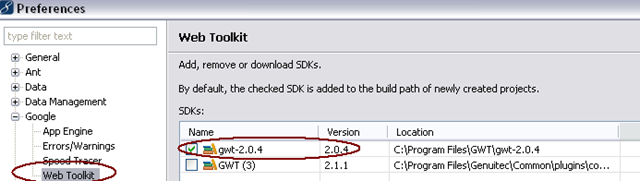
Anyhow, considering the error description and what RPC does, it seemed clear that the client and server sides of the serialization/deserialization process were incompatible. Since I just upgraded, it seems that the JavaScript side was using the new GWT 2.1.x, included with my plugin upgrade, whereas my server was still using the 2.0.x version that I wanted it to. Since I was using the plugin to compile my code to JavaScript, the trick must have been to change the plugin setting to use 2.0.x. I was able to do this via Window > Preferences > Google > Web Toolkit:

image

That wasn’t all though. My development mode was also using the 2.1.x version. In that case I got this error:

[ERROR] Invalid version number “2.1” passed to external.gwtOnLoad(), expected “2.0”; your hosted mode bootstrap file may be out of date; if you are using -noserver try recompiling and redeploying your app

This was a result of my hosted.html file being cached by the browser. Since I had tried to use devmode after mistakenly compiling with the 2.1.x GWT compiler, my browser had a cached version of hosted.html. By clearing my browser cache and restarting, I was able to pick up the newly compiled hosted.html, and devmode started working.

Posted in GWT & App Engine | 1 Comment

Book Review / Overview: “HTML5: Up and Running” by Mark Pilgrim

Review:

image

I’ve just finished reading “HTML5: Up and Running” by Mark Pilgrim (http://diveintohtml5.org/). I liked the book, as it’s a good introduction to the new features of HTML5, and even broken down the way I wanted it to be, i.e. a chapter for each new set of features. However, I was a little disappointed by some of it, so I feel it’s deserving of 3 stars out of 5. The good: an entertaining history of the HTML img tag; introductions to 3rd party libraries Modernizr, html5shiv, and explorecanvas; the example board game in the chapter on the canvas tag (later updated to use local storage); the development gotchas mentioned in the chapter on offline web applications; the detail on new form elements; and the chapter covering microdata. The bad: too much emphasis on Modernizr in chapter 2; too much detail on codecs in the video chapter; and an emphasis on geo.js in the geolocation chapter.

I don’t think I’ll refer back to this book in the future, as it really is just an introduction to HTML5 features, and there are lots of places on the web I can find such a list. If you’ve already been introduced to these features, you might be better off finding a more in depth reference on HTML5. I’ll be looking for one myself, after the new year.

And here’s the overview, chapter by chapter:

Chapter 1 has a nice little section on the history of HTML5 and an example of how the img tag made its way in. A story is a nice start to the book.

Chapter 2 contains a brief listing of the new HTML 5 features, with a short description of each, and the way to detect if your browser supports it. There’s too much of an emphasis on the Modernizr library, though it’s certainly nice to learn that it exists. I also found a useful link to Video for Everybody! in the HTML 5 video section, which I’m likely to look into.

Chapter 3 contains a quick look at some changes in HTML 5 from previous versions, and then proceeds to show a list of the new semantic elements. These are all included in a sample web page with an interesting technique to use these today in non-capable browsers via html5shiv:

  • section
  • nav
  • article
  • aside
  • hgroup
  • header
  • footer
  • time
  • mark

As someone that uses the keyboard  a lot for navigation, and can imagine how cumbersome it can be to skip over links in screen readers, I found this technique for Skip Navigation particularly interesting: http://webaim.org/techniques/skipnav/.

Chapter 4 is an introduction to the canvas element. This is the browser element that allows you to “draw” on a web page using JavaScript. This is a nice basic description with browser compatibility and a straightforward example that happens to be a simple board game. It makes me want to really dig in. The canvas element has been supported in most browsers for a while now, but not in IE < version 9. But explorercanvas exists to imitate the Canvas in current versions of IE.

Chapter 5 introduces us to the video element, <video />. There is probably more details about audio and video codecs and media container formats than I really need or want to know just now, but the inclusion of this information, is useful for future reference and to get across the idea that in general, video on the web is not simple. The things that struck me are: “There is no single combination of containers and codecs that works in all HTML5 browsers.” and: “To make your video watchable across all of these devices and platforms, you’re going to need to encode your video more than once.” There’s also a nice sampling of video encoding tools, including one for Firefox called Firefogg  which encodes Ogg Video (Theora video + Vorbis audio in Ogg container).

Chapter 6 is a brief description of the geolocation support in HTML5. It doesn’t really go very deep and it references a library, geo.js, that uses gears, but Google is not continuing with Gears: http://gearsblog.blogspot.com/2010/02/hello-html5.html, so I’m not sure how useful this library is.

Chapter 7 presents an overview of Local Storage. It has a nice history overview and some details on how to use it, but it does not go into much depth. There is a nice example of how to save and restore a game’s state though. There is extra stuff on Web SQL Database and IndexedDB, but since this stuff is not production ready, it’s interesting, but not very usable.

Chapter 8 contains a good introduction to offline applications. This seemed like particularly good information with a bunch of gotchas for developing apps that work offline, so I think this chapter was just right. I’m sure once I try to develop an app that works offline, I’ll want to dig in deeper, but it’s a nice start. After all, with mobile apps use on the rise, this could be very important info.

Chapter 9 includes the new list of form elements. First off: Thanks for placeholder text!! I won’t need to write JavaScript to do this anymore. Any input field can now contain placeholder text. There’s also a new autofocus attribute, so sites can specify which form field of which form should get focus when a page is loaded.

The new input types are:

  • email
  • url
  • number (with additional attributes: min, max, & step) – can be represented as a spinner image
  • range (also supports: min, max, & step) – can be represented as a slider image
  • date
  • month
  • week
  • time
  • datetime
  • datetime-local
  • search
  • color (which is not currently supported by any browsers)

If a browser doesn’t support the new type, it will just fall back to type=”text”, meaning sites can use these new types right now. HTML5 does specify browser based validation of these new fields, but only Safari has any support at all for this so far (email, url).

Chapter 10 is microdata: “Microdata annotates the DOM with scoped name/value pairs from custom vocabularies.” This chapter describes HTML5 microdata, and some specific examples of how to markup your markup to use it. The examples use microdata formats from Google available at data-vocabulary.org, including ones for event, person and review. This lets you add semantic meaning to your markup without needing more extensions to HTML. Google uses some microdata in it’s search results pages.

Posted in Book Reviews, Web Development | Leave a comment

NECC14 Presentation – Debugging JavaScript in Visual Studio

I gave a talk at the New England Code Camp in Waltham this past Saturday. The topic was on how to debug JavaScript with Visual Studio. As some of my colleagues and friends know, I am a Java/JavaScript coder by day, but I do have opportunities to still code in .Net, fairly regularly, so although I am not a Visual Studio power user, I’m comfortable in it. I have been using Visual Studio to debug JavaScript for close to 3 years at my day job. I still think Firebug is the de facto, must-have debugger for JavaScripters, but since it only runs in Firefox, developers need other options. IMHO, Visual Studio is the best option for Internet Explorer JavaScript debugging.

In fact if you need to do a lot of front-end work for Internet Explorer, my suggested list of tools is:

  • Visual Studio for debugging JavaScript
  • Fiddler or HttpWatch for viewing the Request/Response cycle
  • IE Developer Toolbar for CSS “debugging”
  • DynaTrace Ajax Edition for tracking down performance issues
  • Process Explorer for watching the amount of memory that IE is consuming

Attached below is the power point from my presentation. In addition to explaining how to set up and use Visual Studio to debug, and how to perform some common debugging tasks, I also talked about how/why to use Virtual Machines to debug in other versions of Internet Explorer. I’m including the reference list here:

Power Point Presentation: Debugging JavaScript With Visual Studio

Posted in Web Development | Tagged | Leave a comment

How to find the Teradata Process Id (TDPID) under Windows

I was recently trying to connect to my local Teradata instance via the BTEQ (Basic Teradata Query) command-line tool and ran into a problem trying to login. I usually use the Teradata SQL Assistant GUI based tool, so I don’t need to do this very often.

The command to login while in BTEQ is:

.logon [TDPID]/[username]

But how do you know the value of TDPID? Well, if you’re running Teradata and you’re logged into the computer it’s installed on, you can follow these steps:

  1. Open up Teradata Service Control.
  2. Choose the “Advanced Setup” menu option.
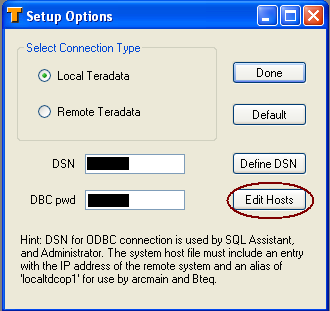
  3. On the dialog box, click the “Edit Hosts” button. This will open your local hosts file in an editor (probably notepad).
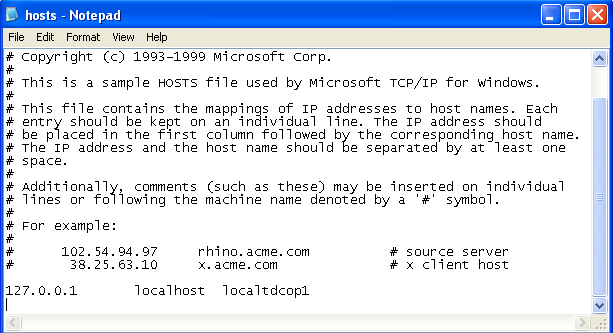
  4. Look for an entry that looks like this:
    127.0.0.1 localhost localtdcop1.
    You’re TDPID is the part of the string before “cop1”, so here it’s “localtd”.


Posted in Miscellaneous, Web Development | 3 Comments

How to find IIS7 logs for your site

I’m not a power user of IIS, so when I do use it, I sometimes need a reminder of how to find something. Recently, I wanted to view the logs of a site, that was running in IIS. IIS also contained several other web and ftp sites. The first step was finding the location of the logs. This was actually pretty easy.

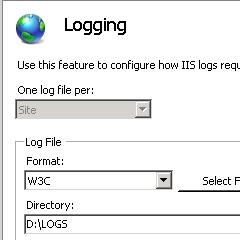
In the IIS console, just open logging, and you can see the location of the logs. Here, it’s D:\LOGS:

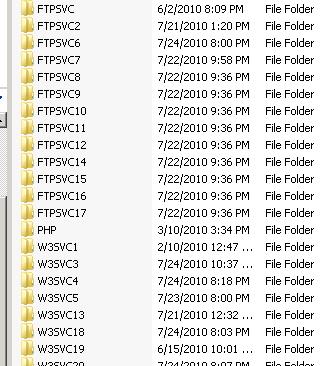
I went to D:\LOGS, and found this:

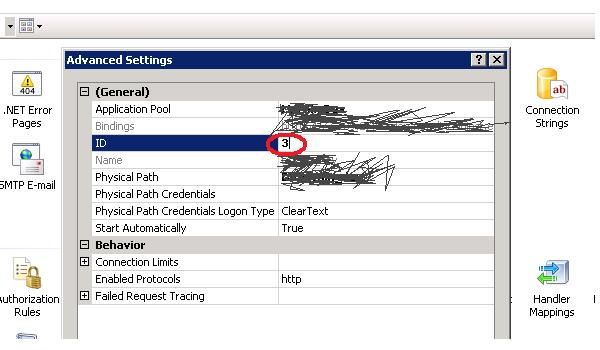
So how do I equate the particular website I want the logs for with the log directory? In the IIS Console, select your site. In the Manage Web Site section of the screen, click on the Advanced Settings link. This will bring up a dialog box. The 3rd value in the box is the site’s service ID. Here it’s 3. This equates to a log directory. Because I happen to be looking at a web site, the log directory for my site is W3SVC3. If the ID were 18, it would be W3SVC18, and if the site were an ftp site, it would be FTPSVC18.

Posted in Web Development | 2 Comments

Still stuck on IE6 in 2010 and need to debug on other versions? How to use MS Virtual PC

I never thought I would get halfway through 2010 and still be building applications for Internet Explorer 6, but here it is July, and I’m still not allowed to update my browser, because my product needs to support IE6. In the past 3 years, whenever I needed to debug in IE7, I fired up VMWare  and used the same Windows XP/IE7 image that a colleague generated for me way back when. But I’ve also used Microsoft VirtualPC for testing IE8 in the past, so I’ve decided I’m going to start from scratch with MS Virtual PC and an image for IE7, and I’m going to document it here, in case I have to do it again, anytime soon. (Like on my laptop where I’ve got IE8, but may want to test backwards.)

Step 1. – Install Microsoft Virtual PC

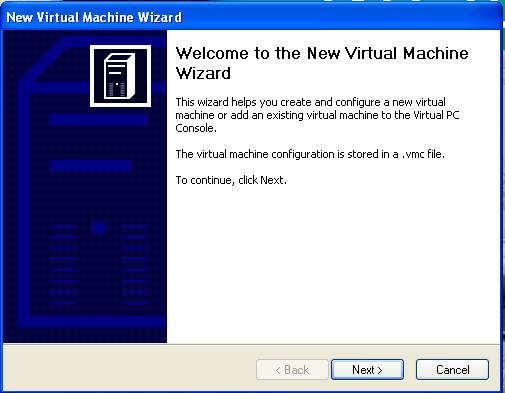
Since I am still running XP, I need Virtual PC 2007:  http://www.microsoft.com/windows/virtual-pc/support/virtual-pc-2007.aspx. There is also a version for Windows 7. (Of course if you were on Windows 7, you wouldn’t be stuck on IE6). After you go through the straightforward install steps and run the application you’ll see this window:

The Virtual PC main screen

Step 2. Download a Virtual Hard Drive Image that contains IE7

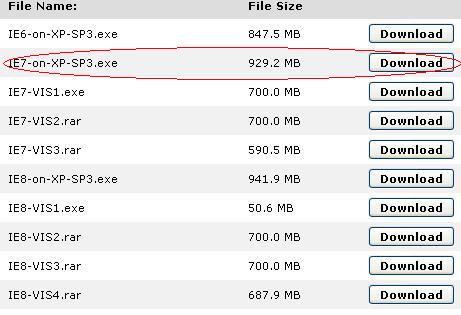
Now that you have the software installed you need an image that will contain the operating system and IE. Conveniently, Microsoft has already set up images that we can download and use to test various IE versions.  Download IE7 image here. I happen to care about IE7-on-XP now, so that’s the one I’m going to download.

Microsoft Virtual PC Images for Testing IE

When this .exe file is done downloading it, execute it. It will generate a vhd file, “IE7 on XP SP3.vhd”. This is a “virtual hard drive”.

Step 3. Create a new Virtual Machine

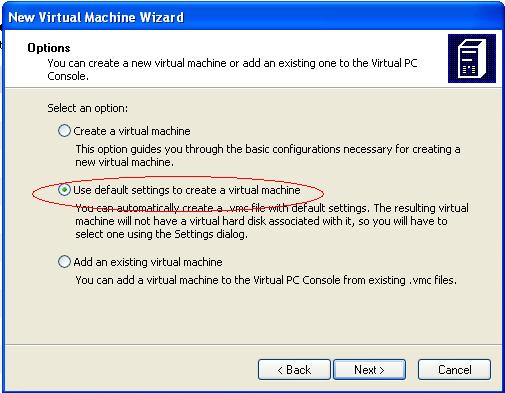
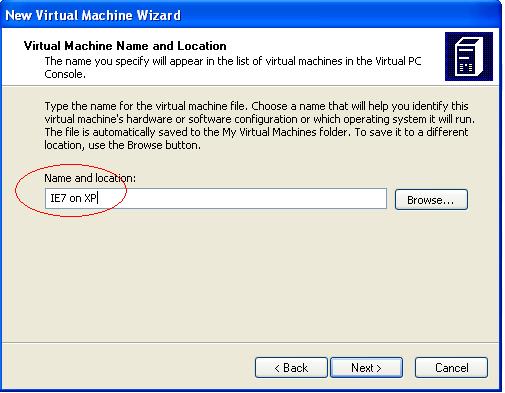
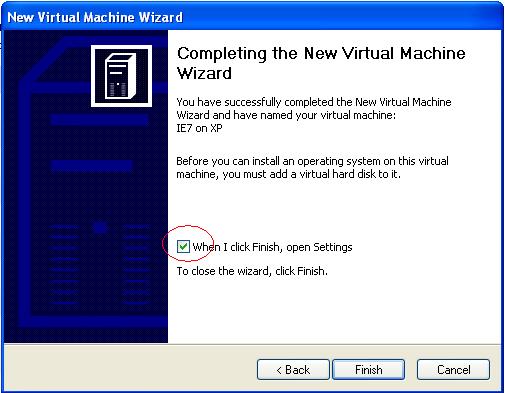
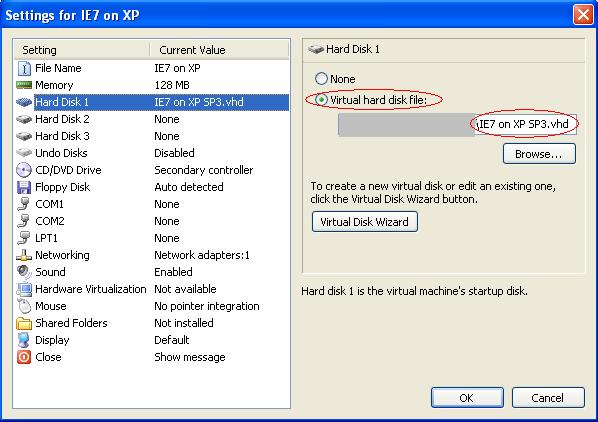
Click on the “New…” button of the Virtual PC Console. Use the default settings to create a new machine. You could choose to create a new one, if you want more control over the settings, but that doesn’t matter much to me. Choose any name for your machine. You want to go into settings after the machine is created, so it’s easiest to leave the settings checkbox checked. When that dialog box opens, choose hard disk 1 and assign to it the vhd file that you downloaded. Press OK.

Step 4. Set up network sharing

Once you’re in your virtual machine, you’re going to want to have Internet Explorer connect to some website, which means you need a network connection. You set this up in the Virtual PC Console Settings too.:

Step 5. Run the Virtual Machine

Now simply start your virtual machine. The executable also created a readme.txt file. That file should have the password for the IETest user on the virtual machine. For me, this was P2ssw0rd.

Step 6:  Run IE and get to work

Assuming you’re up and running, you should be able to run IE and browse the web. If you’re like me, you’re trying to debug a problem in an issue in an application running on the host machine. On the host machine this would be at http://localhost. You’ll need to get the IP address of the host machine and use this instead. In my case I’m running tomcat on port 8080, http://localhost:8080/, so the IP address of my app from within my virtual machine is something like http://123.123.123.123:8080/. My company’s VPN uses DHCP, so I have to check my ip address before every debug session (via ipconfig).

Step 7 Install the other tools you need in the virtual machine

So now you’re able to see and run your app from inside the virtual machine. That doesn’t mean you have everything you need to debug your issues. Install what you need into the virtual machine itself. For me, since I’m debugging both JavaScript and CSS issues in IE7,  I have a couple of tools I like to use, specifically Visual Web Developer Express for JavaScript and the IE Developer toolbar for CSS.

Posted in Web Development | Leave a comment

Azure Firestarter Wrap up

Well the Windows Azure Firestarter organized by the Boston Azure User Group has come and gone. It was a very interesting and informative day. I hope the attendees came away with a good feeling for what the Microsoft cloud is and how developers can quickly leverage their .Net skills to program and deploy to the cloud quickly. For the event, I put together a one time application, utilizing Azure technologies.

In short I had an application made up of a Web Role, an Azure Queue, a Worker Role, and SQL Azure. The public facing web site was a Silverlight application, hosted at baugfirestarter.cloudapp.net, which also contained some simple ASP.Net pages, one that received inputs from other applications, and one that served up JSON data for the Silverlight app to consume.

The idea was rather simple, try to make an Azure based web site that would showcase what you could do with a relatively bare-bones Azure architecture, and use it at the Firestarter. In practice, things at the Firestarter got backed up and it wasn’t really showcased, though people did interact with the website programmatically.

Anyhow, it worked like this:

The Web Role had 3 entry points:

  • a simple page, AcceptPings.aspx, expecting particular arguments, together they represented a “ping” to the firestarter system: This was the “web service” that would accept requests and put those arguments on the Azure queue for future processing. The return type was text, and the page only returned “ok” or “failed”
  • a simple page, GetData.aspx, that would return all the pings to the caller as application/json; this was used as a data feed to the Silverlight front end
  • a page hosting a Silverlight application which itself was made up of 4 pages, one of which was a visualizations page and consumed the data provided by the GetData.aspx page

The flow was like this:

  • A user at the firestarter used a sample application to build and deploy a working application to Azure. In that application they would make a call to AcceptPings.aspx with the expected arguments (sample code provided, so user could cut/paste).
  • AcceptPings.aspx would accept the arguments, package them up and put them on an Azure Queue
  • The Worker role would periodically look for messages on the queue and when it found one, it would unpackage it, and store the data in SQL Azure. If a particular argument were present, it indicated that the user wanted to also tweet a message, and this worker role would also hit the Twitter API to tweet the message as a special user, set up just for this event. (using basic auth, which Twitter is disabling very soon)
  • One of the pages in the Silverlight application was a visualizations page, using the Silverlight Toolkit for pie chart functionality, and a grid for simple data display. On a timer (~every 15 seconds), that page would hit GetData.aspx for updated data, and update the pie chart and data grid on the page. This would allow us to see the pie chart and data grid to fill up as users were getting their applications working. If they happened to be following the twitter hashtag we advertised for the event (#bafs), they might also see the new tweets that were going out.

This was a great test app for me to build. It had lots of the components needed for your basic Azure application. Unfortunately, besides being new to Azure, I’m also quite new to Silverlight, the Silverlight Toolkit, and linq, so I took the quickest route  I could to get these working, within the application, the way I wanted to – very plain, basic Silverlight pages, JSON for data transfer (just because I’m so familiar with this), etc.

Posted in Azure | Leave a comment