
This is a simple step-by-step list of how to access the Liferay UserService from a C#.Net client, using Visual Studio 2010 to generate the proxy classes. I’m including this here because I ran into a number of issues while doing this myself, and want to record it for future reference.
Overview:
- Liferay 5.1.2 on tomcat 6.0, running at http://localhost:8080/
- Visual Studio 2010
- C#.Net Console App.
Steps:
- Configure Liferay to allow connections from your client. Do this in portal-ext.properties (webapps\ROOT\WEB-INF\classes). The highlighted IP Address below is the IP address of the machine I was running from. You may only need 127.0.0.1:
|
## |
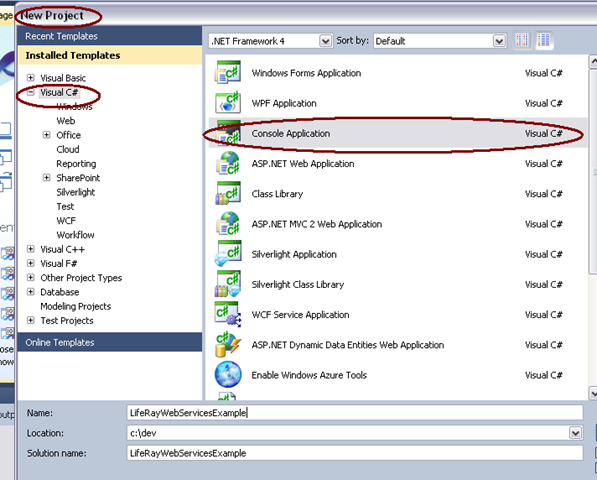
- In Visual Studio (VS) create the project as a console application.
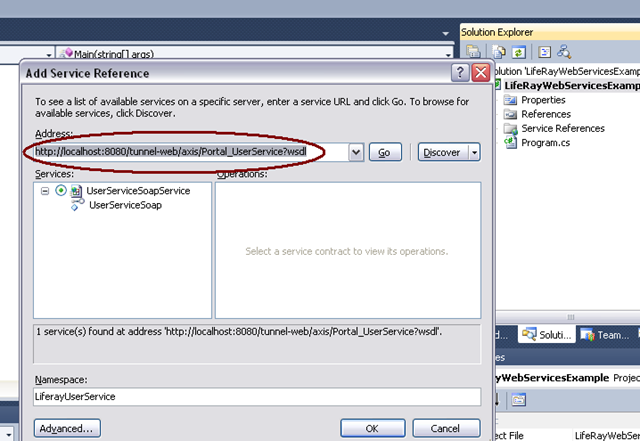
- Add a service reference to http://localhost:8080/tunnel-web/axis/Portal_UserService?wsdl. I named mine LiferayUserService.
- The create project wizard will have created a file named Program.cs. To that, add the lines of code highlighted below, and run in the debugger:
|
using System; namespace LifeRayWebServicesExample |
- You should get an InvalidOperationException with the message, “RPC Message updateUserRequest1 in operation updateUser1 has an invalid body name updateUser. It must be updateUser1”. This is a problem in the proxy classes that were generated. We’ll need to edit these to get past the problem.

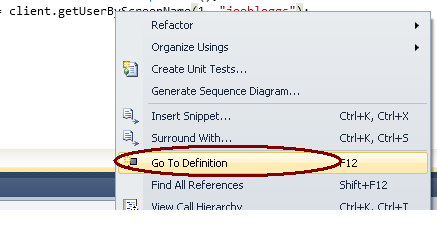
- Right click on the method getUserByScreenName and choose Go To Definition. This will open the file we want, Reference.cs (LifeRayWebServicesExample\Service References\LiferayUserService\Reference.cs).
- Look for a piece of code that looks like the code below, and change “updateUser” to “updateUser1”. Run in the debugger again.
|
[System.ServiceModel.MessageContractAttribute(WrapperName=”updateUser“, WrapperNamespace=”urn:http.service.portal.liferay.com”, IsWrapped=true)] |
- You should get another InvalidOperationException with the message, “RPC Message updateUserResponse1 in operation updateUser1 has an invalid body name updateUserResponse. It must be updateUser1Response”. We need to make more edits in Reference.cs. On the partial class updateUserResponse1, change the WrapperName from “updateUserResponse” to “updateUser1Response”. Run in the debugger again.
|
[System.ServiceModel.MessageContractAttribute(WrapperName=”updateUserResponse“, WrapperNamespace=”urn:http.service.portal.liferay.com”, IsWrapped=true)] |
- This time you should get a FaultException, with a message that you have a “java.rmi.RemoteException”. This means you’re getting to your Liferay instance. If you look in your tomcat/liferay logs, you might see something like the error showing below. It’s time to fix our authentication.
|
17:06:29,561 ERROR [UserServiceSoap:60] java.lang.NullPointerException |
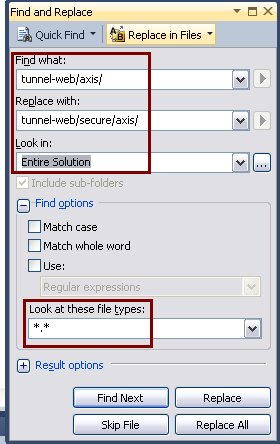
- First we should be hitting the secure url for web services, http://localhost:8080/tunnel-web/secure/axis/Portal_UserService?wsdl. Note that this url is different than the one we used to generate the proxy classes. The easiest way to do this is to use the Replace in Files feature of VS. After making this change, run in the debugger again.
- Next you should see a MessageSecurityException, “The HTTP request is unauthorized with client authentication scheme ‘Anonymous’. The authentication header received from the server was ‘Basic realm=\”PortalRealm\”‘.” We need to change the configuration of our web service to send authorization information. Open the app.config file. Find the section that contains the binding for the web service and replace the security node.
Before:
|
<security mode=”None”> |
After:
|
<security mode=”TransportCredentialOnly”> |
- That’s not all though. Go back to the program’s main method and add login credentials. Adjust the UserName (liferay userId) and Password to match an authorized user in your system:
|
static void Main(string[] args) |
If you run now you should see this:
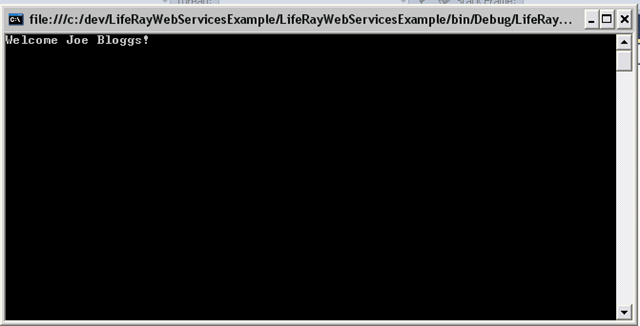
That’s it. It’s not straight forward. This took me hours to figure out, but now that I have this recorded, it won’t take so long next time.
I’ve posted the source code for this on github: https://github.com/squdgy/LiferayWebServicesFromDotNet.
 In the sludgy, squdgy creek
Hello I use Liferay and I needed to access using a web service to post data in the user table through an external system.
When performing a search, it works perfectly but when trying to post a new user in liferay it returns an error java.rmi.RemoteException, and worse is the following when trying to search the record that was inserted he returns, but if I go in Liferay and check on the table if the record exists, the record of the user is not there! Seems that it generates a cache but the consummation of the insert in the table is not actually made, you have some idea of what might be hap?
Thank you Sincerely,
Jason Lopes
Hello Jason,
I can’t tell you what is happening exactly, but I suggest you look in the tomcat/Liferay logs. There should be an error there that should help you narrow down the problem. (If there’s no error, you may need to increase the log level.)
The problem could be a lot of different things. I saw errors in my logs when my authentication code was wrong, when I was missing a value that was required by the insert, and when my Liferay instance was not configured for connections from the IP address of the server I was running my web service code from. Your problem could be any of these or something else entirely.
Ok, I managed to solve the problem, followed all the steps of the tutorial and got to the inclusion in the tables of Liferay.
Thank you, your tutorial was very helpful!
I’m glad you solved the problem, and I’m glad my post helped.
I have successfully implemented this on Liferay 6. There were some additional tweaks needed such as changing additional WrapperNames. I also had to re-do the WrapperName changes after I replaced the tunnel-web\axis with tunnel-web\secure\axis.
Thank you for such a great post!
Pingback: .NET: Programmatically Adding Users in Liferay 6.0 using C Sharp « Endivian
I have found that when using “old fashioned” AddServiceReference, it correctly generates classes with overloads, even in VS2012.
Dear Pazu,
can you please explain this in more detail? What do you mean by “old fashinoned” AddServiceReference?
Thanks!