Taking a SQL Server Database offline

I’ve had to take a SQL Server database offline several times lately, and I keep forgetting the names of the commands I need to use, so I’m saving them here for future use.

To take the database offline:

ALTER DATABASE database_name SET OFFLINE

To put the database back online:

ALTER DATABASE database_name SET ONLINE

Sometimes taking the database offline will fail, because there are existing connections to the database. You can find those existing connections with sp_who():

EXEC sp_who

By searching for your database in the dbname column.

Then, assuming you have permission to kill those connections, you can use spid from the same row to do so:

KILL spid

Once all those connections are gone, you should be able to take the database offline.

Posted in Database, Miscellaneous | Leave a comment

Book Review / Overview: “Tapworthy: Designing Great iPhone Apps” by Josh Clark

Review:

5of5stars

I read Josh Clark’s book earlier this year.  The introduction included the perfect quote to describe what this book was about: “This book teaches you how to “think iPhone.” It isn’t a programming book. It’s not a marketing book. It’s about the design, psychology, culture, usability, and ergonomics of the iPhone and its apps.” For someone like me, a programmer, who does not have much design sense, and who has never worked in the mobile space before, this book was quite insightful, but… the book is not aimed at programmers. It really is a book for designers… of iPhone apps.

I enjoyed reading this book and felt that I learned a lot from it. If you want to build iPhone user interfaces, I can’t think of a better, more complete reference, and I definitely recommend it. If you’re not designing the UI, or if you’re designing the UI for a different mobile platform, it won’t be quite as useful, since other platforms, such as Android have some different standards. Overall though, this is an excellent book.

Per Chapter Overview:

Chapter 1: “How we use iPhone apps” – This chapter is really an introduction to iPhone app use: the common contexts that users find themselves in when they’re using apps, the quick in-and-out of many iPhone apps (get in; do what you want; then get out), the limitations of a small screen and big fingers, and the thing that applies to all applications, mobile or not: simplicity of user interface.

Chapter 2: “Is it Tapworthy?” – This chapter was about creating an app that users would want to buy. A good point was made about when a user might us an app, any app:

  • “I’m microtasking.”
  • “I’m local.”
  • “I’m bored.”
  • There was a good story from Josh Williams of GoWalla on how/why/what they decided to build for a mobile app, and there’s some good discussion on what sorts of features to include. I liked this quote: “An effortless user experience requires a streamlined selection of tapworthy features. It all goes back to the iPhone’s environment of scarcity—limited attention, time, pixels, device memory, and processing power.”

Chapter 3: “Tiny Touchscreen” – This chapter is about fitting your app into the tiny screen. It covers ergonomics and designing for users that will use your app with one hand. It covers designing controls that work well with a thumb and goes over the best placement for controls, considering how most users use their iPhone. It also includes tips for trade-offs with the chrome and the content, for instance putting detail on an entirely different screen.

Chapter 4: “Get Organized” – This chapter is about designing the navigation of your app. Use the built-in navigation models. There are 3 basic navigation strategies: flat pages, tab bar, and tree structure. Make sure there is a clear pathway through your app, not a web. Prototype and follow Apple’s design conventions

Chapter 5: “The Standard Controls” – As the title suggests, this covers the standard controls that come standard with the iPhone. The chapter goes into good depth on most controls, describing how they’re used and in what situations you’d want to use them. There are also some useful recommendations about which keyboards to use and where to put controls.

Chapter 6: “Stand Out” – This chapter is all about giving your app a visual identity, a look and feel that will be unique and recognizable. There are good tips on lighting effects, gradients and textures, all things you can combine to give your app its own ‘personality’.

Chapter 7: “First Impressions” – This section is all about making a good first impression with your app, from the icon you create for the App store, to the splash screen that displays when your app is loading, to the first screen a new user would see. There are some really great tips and techniques in here, for making a good first impression on your users.

Chapter 8: “Swipe! Pinch! Flick” – As you can imagine, this is all about gestures. This is a really insightful chapter covering the common gestures and ways to incorporate gestures in your app that make sense and won’t confuse your users. There’s also discussion on the shake gesture, as it seems to becoming an undo/redo action. It discusses giving users a non-gesture way to perform an action they’d perform with a gesture and giving visual feedback.

Chapter 9: “Know the Landscape” – This chapter is about the design considerations involved when choosing to build your app for  landscape and/or portrait mode. There’s some good information on why users switch orientation and good discussion on why your app may or may not want to support both orientations.

Chapter 10: “Polite Conversation” – This section is about providing messages to your users, and discusses alerts, badges, spinners, model buttons, and diversions. It’s all in the name of being polite and useful to your user, complete with references to Emily Post.

Chapter 11: “Howdy, Neighbor” – This chapter is about playing nice with other apps on the phone and with user data, transferring control to another app when appropriate; using the common data stores (contacts, photos, calendar), instead of rolling your own; and using  web views and map views within your app to avoid too much app switching.

Posted in Book Reviews, Mobile | Leave a comment

Running into the Internet Explorer Travel Log bug

I recently ran into some strange behavior in an application that I was working with. In some particular conditions, the browser back button would become disabled, and I could no longer go back to see the last page I was on. At first I thought it was a random browser bug, unrelated to the page I was viewing, but with some repeated testing, I could always get this issue to occur on a particular page in my application. So something in the application had to be having this effect on the browser.

After exhaustively searching through the source code to make sure nothing in the code was touching the browser history (nothing was), I started looking elsewhere. Because this particular page did not show the bad behavior with a small data set, but did with a large data set, that gave me some search criteria to use to start my search. It didn’t take long. I found the description of the problem here: http://www.enhanceie.com/ie/bugs.asp. (This site is updated by Eric Lawrence of Microsoft and Fiddler fame) It’s known as the Travel Log bug, and is summarized on that page like so:

“If there is a form input field with a value longer than 523,659 characters, when you navigate away from the page, IE may clear the current session’s travellog (similar to history), disabling the back and forward buttons.”

Don’t know what a Travel Log is? I didn’t either, even though I’ve been programming for the web for more than 10 years. Here’s Microsoft’s description of the travel log: http://msdn.microsoft.com/en-us/library/aa768366%28v=vs.85%29.aspx. In full-blown IE you might recognize it as the list of visited locations that show up when you click the drop-down links next to the back and forward buttons:

image

So how could I have > 523,659 characters in one form field? In my case it came down to View State. The application was indiscriminantly saving lots of data in the View State, which gets written to a hidden form field on the page. Now I have to go back and figure out what it’s saving there and why. The page is big, but not so big that I should need that much View State.

I reproduced this issue in Internet Explorer 7 and 8, but things worked fine in Internet Explorer 9.

image If I have free time and a TV, you can be pretty safe in guessing that I’m watching a classic movie. This topic reminded me of one, “Sullivan’s Travels’” by director Preston Sturges. It stars Joel McCrea and Veronica Lake, and I highly recommend it (8.2/10 stars on imdb.com). If you’ve seen and enjoyed the Coen brothers movie “O Brother, Where Art Thou?”,  you might have particular interest, since that is the name of the movie that the lead character in “Sullivan’s Travels” is planning to make. Coincidence? Nope.

Posted in ASP.Net, Web Development | Leave a comment

New England Code Camp 15 Presentation – Introduction to the Ext JS JavaScript framework "for Rich Apps in Every Browser"

Joan Wortman and I gave a talk at New England Code Camp 15 last weekend. The talk was titled “Introduction to the Ext JS
JavaScript framework “for Rich Apps in Every Browser””. 

Here are the slides for that talk: Introduction to Ext JS 4 slides

Posted in Ext JS, JavaScript, Web Development | Leave a comment

New England Give Camp 2011 Recap – “Code it Forward”

Over the first weekend in May I had the pleasure of joining more than 100 other volunteers to help ~29 non-profits with technical challenges in the 2nd annual New England Give Camp, held at the Microsoft NERD (New England Research and Development) Center in Cambridge, MA. The weekend started off Friday evening and went through Sunday afternoon where we all got to show off the fruits of our labor. The large range of projects included new logos for branding and social media, new websites, new website functionality for existing sites, a fabulous intro video, a cool new Android application, new database tools, etc. It was awesome to see the end products.

I had the pleasure of working on team SolarVisionaries.org with my teammates Brian and Molly, and with our client Joe. We also had invaluable assists from designers Nick and Brian. Our goal, put together a new site for OneSolarRoof.com, a non-profit aimed at helping consumers find reputable, local contractors to install solar panels, and educate those consumers on what’s involved with going solar, anything from whether their home would even benefit (It turns out this partially depends on the direction your roof faces), to what benefit they’d expect, to what incentives they can expect to receive from their state or municipality. Our client was full of enthusiasm, and the technology challenges were interesting. Our project ended up with these features:

  • A new WordPress website
  • A beautiful new logo and site header
  • A Google Fusion Tables map showing solar installations on a Google map, data coming from a spreadsheet
  • Subdomains that mapped to location specific versions of the map
  • A Bing Maps page that allowed a user to zoom in to an address entered into a form. – We didn’t finish this feature, which was supposed to zoom in on a person’s home. 😦

Considering we had less than 48 hours, I’m impressed with the amount of work we were able to accomplish. I would like to acknowledge the organizers of this event, especially Jim O’Neil and Kelley Muir. The incredible amount of time and effort they put into this event is just staggering to think about. They really took what they learned from the 2010 event and improved on every aspect of it, and I look forward to being involved in 2012 too. Of course, I have to thank my team. Brian, Molly, and Joe couldn’t have been more of a pleasure to work with. They were are wonderful. I’d also like to acknowledge the sponsors. There are too many to name, but I will recognize my own employer, Teradata, for supporting this for the 2nd year in a row. Thanks to the sponsors, we were well fed and had lots of technical resources. You rock!!!

tents_at_nerd

P.S. If you sign up for the 2012 NEGiveCamp, you too can sleep in a tent on the floor at Microsoft (mine is the one in the foreground), meet new, interesting colleagues, watch newbie sailors from community boating capsize on the Charles river, root for you favorite crew team in the Sunday morning crew races visible from the riverside of the venue, or even escape for an afternoon constitutional on the campus of MIT (Saturday was an Open House). The weekend is made up of far more than heads down coding, and I recommend it to anyone in the web development field. And if you don’t live in/near New England, Give Camps are popping up everywhere: http://givecamp.org/.

Posted in Miscellaneous, Web Development | 1 Comment

Book Review / Overview: “EXT JS In Action” by Jesus Garcia

Review:

3_5of5stars

Ext JS by Sencha is a terrific JavaScript framework for building Rich Internet Applications (http://www.sencha.com/products/extjs/). I’ve been using Ext JS since version 1.x, and do some pretty advanced stuff with it, so this is not a newbie review. To their credit, Sencha has superior API documentation and samples, compared to some other JavaScript frameworks I’ve used. I love the framework. However, I absolutely can’t stand the Sencha developer forums. The search is terrible, and there have been far too many snarky or rude posters there, so when I need more advanced information or insight, it’s not terribly easy to find. That’s why I was glad to see a Manning book that covers the Ext JS framework with in-depth examples.

I think the author has some terrific examples and he goes over the materials in a very organized way. Since finishing the book a couple of weeks ago, I’ve already picked it up to refer to some of the examples as references. I would have liked to give it a higher rating, since for me it had a ton of good stuff and good value, but I think a newbie would be very overwhelmed with the material. There is so much stuff here, that it’s going to be difficult to grok without multiple readings, and trying the code samples. For instance, I’m aware of the power of Ext JS configuration shortcuts, but I think it’s really confusing for new users, when there are multiple ways to do the same thing.

I would recommend this book, but if you’re thinking of buying this you might want to wait, because Ext JS 4.0 was officially released today, and it looks like there might be enough changes that an update to this book would be called for. But, based on this book, I already plan to dig into “Sencha Touch in Action”, by this same author. I know he’ll do his homework, and have very detailed examples. I’m looking forward to it.

Chapter by Chapter overview:

Chapter 1 – As in most books that are generally about one technology, Chapter 1 is an introduction to the Ext JS framework. It was written against the 2.x framework, even though the 3.x framework has been out for over a year now, and the 4.x framework was released today. It introduces the 6 core parts of Ext JS: Ext JS core, UI components, web remoting, data services, drag and drop, and general utilities. It contains a brief description of what makes up each part and then finishes off with a hello world example.

Chapter 2 – This covers Ext.onReady, waiting until the browser DOM is ready before executing JavaScript; Ext.Element, how you can manipulate the dom node by node easily with the methods on Element; and Templates and XTemplates, techniques for using the template engine to easily create simple or complex html fragments that can be inserted into a page. This is a nice chapter, but some of the advanced XTemplate usage really is advanced.

Chapter 3 – This is an introduction to events, components and containers. It’s a good overview, but if you’re brand new to ExtJS, I think it can be a little overwhelming. I’m not sure events should have been introduced before components.

Chapter 4 – This chapter introduces you to the window component, the panel component, the TabPanel, and the MessageBox. There are some good examples here, but you really need to try this stuff to understand it.

Chapter 5 – This goes over the various layouts provided with Ext JS. This is a really useful chapter, as, although the Sencha demos show very nice examples of the various layouts, it’s good to have some explanation of when/why you’d use one over another. The diagram of the layout hierarchy is also incredibly useful. Layouts in Ext JS were always something I stumbled with, so even after years of using them, I’ve learned something in this chapter. In fact, the concepts are the same as with Ext GWT, and I need to work on an Ext GWT layout today, so I’ll have the book open while I work.

Chapter 6 – It’s all about the forms, from FormPanel to FieldSets to individual form fields, like text and number fields, and the data store backed combobox. There’s a little of everything in this chapter. It touches on ajax form submission, with success and failure callbacks, and with complex form layouts. There’s so much packed in this one chapter that it might take someone new to Ext JS a few readings and trying the examples to learn everything there is here.

Chapter 7 – This is the chapter that introduces and really covers the GridPanel. Since there is so much to a grid, there is an awful lot in this chapter. This is another chapter that you may need to pore over a few times if you’re new to Ext JS. Again, I think data stores and data proxies should have been broken out into a chapter of its own, before this one.

Chapter 8 – The EditorGridPanel is introduced in this chapter. It builds on the Store and GridPanel from the previous chapter to show how you can do “inline” editing in a grid on your page, and how you persist those values back to a server, either through use of the Ajax methods in Ext JS or through the use of a DataWriter. I haven’t used a DataWriter before, but I can see the power of it through the provided example.

Chapter 9 – This chapter works through a really great example of using DataView, ListView, XTemplate, and FormPanel to show selection and editing. It’s a lot to absorb, but really useful.

Chapter 1o – This is about the Ext JS support for charts: line, bar, pie and column. Ext JS charts are flash-based, use the 3rd party YUI charts under the hood and utilize an Ext JS DataStore for values. This is all interesting, and the charts look good, but Flash will not be acceptable for some projects, and Ext JS 4.0 has replaced the flash charts with pure JavaScript charts, so I did not go into depth in this chapter.

Chapter 11 – It’s all about TreePanels, widgets that display hierarchical data. This is a very nice concise chapter about how to use a TreePanel and how to add/edit/delete values in the TreePanel. I only wish the current TreePanel data access were more like grid access. In this chapter, I especially like how the author builds up the code starting with empty functions that are needed and then filling them in later.

Chapter 12 – This chapter covers menus, buttons, and toolbars. These are super easy to use in Ext JS, and this chapter describes them very well. I was even introduced to Ext.Action a useful abstraction for reusing menu and button configuration information. I’m also excited to see the layout changes for buttons and button groups, some of which weren’t possible under Ext JS 2.x.

Chapter 13 – “Drag-and-drop basics” – This is a really interesting chapter on drag and drop with Ext JS. It has a very nice concise example, but going through it and running it shows that coding drag/drop is not really intuitive in Ext JS. But it is very powerful. I hope to get the chance to use this in a real project.

Chapter 14 – This is about more advanced drag-and-drop. It contains examples of drag/drop with DataViews, GridPanels and TreePanels. This is another heavy source code chapter that I expect to need to review if I ever get the chance to implement drag/drop with Ext JS.

Chapter 15 – This covers Ext JS extensions and plug-ins. This covers the old and new patterns for Ext.extend(), and has a nice simple example of an extension which the author then converts to a plug-in.

Chapters 16 & 17 – I’m grouping these together, because they both cover application development techniques for creating an Ext JS application. They talk about layering the JavaScript, making use of inheritance for code reuse, and using appropriate namespaces. There’s discussion about keep application logic separate from ui logic, and using custom events to send and receive messages. Combined, these 2 chapters build an entire application with Ext JS, so there’s tons of code, but if you need to create an Ext JS application from scratch this can be a useful example.

Posted in Book Reviews, Ext JS, JavaScript, Web Development | 1 Comment

Liferay Theme Files Without a Cache-Control Header?!

I ran into an interesting situation with our web application as we started to do some testing where our portal server (Liferay 5.1.2 on tomcat 6) was on the west coast and the testers on the east coast. The application was slower than we expected, compared to testing with a local server. (We did expect it to be slower, just not as slow as it was.) Some analysis with Fiddler quickly pointed out that our application was requesting a bunch of static resources (CSS, JS, images) from the server which were returning HTTP 304 (not modified) codes.  Just making those requests across the country was adding up to about 2.5 second on our page load time!! (BTW, this is with IE8) Those files were not in our application, but in the Liferay theme that we deployed. Since we have a custom theme, I looked at the source code to see what it was serving up. The web.xml file for our theme looks like this:

<filter>
    <filter-name>Header Filter</filter-name>
    <filter-class>com.liferay.portal.kernel.servlet.PortalClassLoaderFilter</filter-class>
    <init-param>
        <param-name>filter-class</param-name>
        <param-value>com.liferay.portal.servlet.filters.header.HeaderFilter</param-value>
    </init-param>
    <init-param>
        <param-name>Cache-Control</param-name>
        <param-value>max-age=172801, public</param-value>
    </init-param>
    <init-param>
        <param-name>Expires</param-name>
        <param-value>172801</param-value>
    </init-param>
</filter>

….

<filter-mapping>
    <filter-name>Header Filter</filter-name>
    <url-pattern>*.png</url-pattern>
</filter-mapping>

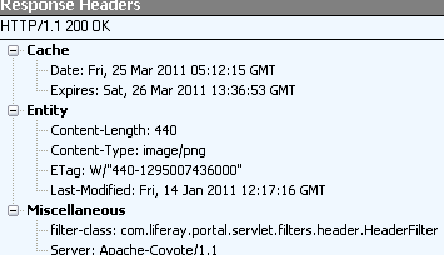
What’s shown here should cause both the Cache-Control and Expires HTTP headers to be added to all png images. This is not what I was seeing. This is what I did see, with no Cache-Control header:

image

A quick internet searched showed me the source code for HeaderFilter, and another quick search found this logged issue: http://issues.liferay.com/browse/LEP-5895. To resolve LEP-5895, this code was added to the filter:

// LEP-5895

boolean addHeader = true;

if (name.equalsIgnoreCase(HttpHeaders.CACHE_CONTROL)) {
    HttpServletRequest httpReq = (HttpServletRequest)req;

    HttpSession ses = httpReq.getSession(false);

    if ((ses == null) || ses.isNew()) {
        addHeader = false;
    }
}

if (addHeader) {
    httpRes.addHeader(name, value);
}

Well, for a theme, addHeader will always be false, meaning that the Cache-Control header will never get added. Our application will always make requests for these static resources, even if they’re in the cache.

The Solution?

Since Liferay is now at version 6, I’m not expecting that there will be a change to Liferay 5 to address this. And, since this is actually our own theme, we plan to ship our own servlet filter with the theme. Our filter will add the Cache-Control header, and hopefully we can save those 2.5 seconds!

Posted in Java Development, Miscellaneous, Web Development | 2 Comments

GMail Tries to Prevent You From Making Mistakes?

I was quite suprised today when I sent an email to a colleague, telling them that I attached a file in a web-based system that we use, and got an interesting popup: “Did you mean to attach files? You wrote “I’ve attached” in your message, but there are no files attached. Send anyway?”

image

I have certainly made the mistake of not attaching a file to an email when I meant to, but in this case I didn’t. I was quite amused by this, and it has me wondering… What other mistakes is Google/GMail trying to help us avoid?

Posted in Miscellaneous | Leave a comment

O’Reilly Media Wish List Contest

O’Reilly is having a wish list contest! http://oreilly.com/new-year-2011.

“Compile a wish list of O’Reilly titles — print or ebook or video or all — that you’d like to own, totaling up to $500 in value. Post that list online (your blog, your Facebook page, etc.), and send us the link by 11:59pm PST on Tuesday, Feb. 22, 2011.”

I love to read O’Reilly books, and I also enjoy the videos and training classes, so here’s my wish list:

Title Preferred Format Price
21 Recipes for Mining Twitter Ebook 16.99
Offline Mobile Web Applications in HTML5 Video 24.99
Beautiful Visualization Ebook 47.99
The Browser Performance Toolkit Video 49.99
HTML & CSS: The Good Parts Ebook 27.99
Cross-Platform Mobile Development with PhoneGap Video 29.99
Canvas Pocket Reference Print+Ebook 14.29
97 Things Every Software Architect Should Know Ebook 27.99
25 Recipes for Getting Started with R Ebook 14.99
Great R: Level 1 Video 34.99
Getting Started with Processing Ebook 12.99
Data Analysis with Open Source Tools Ebook 31.99
jQuery Cookbook Ebook 27.99
jQuery Pocket Reference Print+Ebook 14.29
Your Brain: The Missing Manual Ebook 19.99
Your Body: The Missing Manual Ebook 19.99

How to Build an SMS Service

Ebook 9.99
HTML5 Canvas Pre-Order Print 39.99
Mining the Social Web Ebook 31.99
  TOTAL: 499.41
Posted in Miscellaneous | Leave a comment

Book Review / Overview: “Azure in Action” by Chris Hay and Brian H. Prince

Review

image

I read “Azure in Action” in November of 2010 (during my travel to/from PDC), but am just going over it again now. I’ve been dipping my toe in Azure for something like 15 months now, but dipping is as far as I get, because unless I make a concerted effort to write something for Azure, I have no professional requirement to do so, and that probably won’t change any time soon. Still, I’m trying to keep my knowledge of Azure relatively up to date. With new and rapidly evolving technology like Azure, this is usually accomplished by trying examples, reading blog posts, and attending talks by folks who are using Azure in their day jobs. Books can become obsolete very quickly, but I like to learn from books.

I really thought this was an excellent introduction to Azure for developers. The authors provided clear explanations and appropriate diagrams and coding examples where necessary, and I felt comfortable with the writing style. I would definitely recommend that a developer just starting with Azure read this book.

Section by section overview

Normally when I write these overviews I keep per-chapter notes while I’m reading the book, but since I read this book last year and am just reviewing what I’ve read before, I’m dropping down to a section by section overview. This book has 6 sections, which it calls parts: “Welcome to the Cloud”, “Understanding the Azure Service Model”, “Running Your Site with Web Roles”, “Working with BLOB Storage”,  “Working with Structured Data”, and “Doing Work with Messages”.

Part 1: “Welcome to the Cloud” – I’m not sure this needs an overview, since the section is an overview. I will say that the 2 chapters on this are really great. They make up a succinct introduction to what Azure is, especially its architecture, and to how the typical developer would build and deploy an application to Azure. It has particularly good diagrams of what Azure is, and a very good coding example. Even though I’d been looking at Azure for more than a year before reading this book, I really liked the way this information was presented, and it helped solidify my understanding.

Part 2: “Understanding the Azure Service Model” – This section contains more overview and introduction, but that does make sense, considering how new Azure is. There is a nice overview of the Fabric Controller and service model, and how you and Azure manage your applications, sometimes automatically. Once deployed, cloud Azure manages your application instances, and it’s helpful to understand how it does this and what configuration options we need to include to ensure our application’s uptime. And then there is practical instruction on how to configure a real application to take advantage of the Azure architecture… good stuff.

Part 3: “Running your site with web roles” – This section covers web roles. Web roles are basically IIS processes… something that runs in the web server. Usually this is a web site. Anything that IIS7 supports should be runnable in a web role. This includes Asp.Net and PHP. There’s information on scaling out your application to support web load. Scaling out in Azure is a combination of coding practices that allow your application to run on multiple servers (like not saving session state on one server), and Azure configuration settings (like declaring how many instances of your web role you want to run). Because PHP can run in IIS, it can also run in Azure. In fact, I just read elsewhere that Drupal now runs in Azure. Other processes (think of a server-side image converter) can run in Azure and be called from your web role, which vastly expands the possibilities of what your web application can do.

Part 4: “Working with BLOB storage” – This section covers blob storage. Blob storage is persistent storage for any large data – think files. You can store images, text files, zip files, or even entire static html websites in blob storage and programmatically access this data. Blob storage even has a REST API, so with appropriate permissions set, you can directly access a “file” in blob storage via a URL. This section describes this in detail, and then shows how you access BLOBs in your applications and then from outside of Azure. Azure even has a CDN service for BLOBs.

Part 5: “Working with structured data” – This section is all about how you persist data in Azure. It covers Azure Table Storage, a no-sql key/value data store and SQL Azure, SQL Server in the cloud. This covers what each is, how you program to it and why you’d want to use one over the other.

Part 6: “Doing work with messages” – This section has chapters that cover worker roles – think services or simply non-IIS based applications, the Azure queue, AppFabric services, and the service management APIs. That’s a lot to include in one section. This is important stuff if you want to build a highly scalable cloud application. If you use these pieces properly, you can offload heavy duty processing into worker roles, seemlessly spin up new instances of your application without rewriting code or changing application configuration, and even communicate securely with off-Azure resources.

Posted in Azure, Book Reviews | Leave a comment